.webp)

Meeting room booking software has become essential for hybrid offices.
Employees are no longer in the office every day. Teams come in on different schedules. Meetings happen across in-person and remote participants. Rooms need the right capacity, equipment, location, and availability.
That makes room scheduling more complicated than simply reserving a conference room on a calendar.
The short answer: The best meeting room booking software helps employees find and reserve the right room, syncs with Outlook or Google Calendar, prevents double bookings, supports room displays and check-ins, releases unused rooms, and gives workplace teams analytics on room usage.
The best tools do more than book rooms.
They make the entire office easier to coordinate.

In a traditional office, room booking was already frustrating.
In a hybrid office, the problem gets harder.
Employees need to know:
Without the right system, employees waste time searching for rooms or booking spaces that do not match their needs.
This creates one of the most common workplace complaints:
“All the rooms are booked, but half of them are empty.”
That is usually a sign the company needs better meeting room booking software, not necessarily more meeting rooms.
The best meeting room booking software should help employees answer one simple question:
Where can I meet right now or later today?
But behind that simple question, the software needs to handle a lot of complexity.
A strong platform should support:
If the software only reserves a room but does not help manage usage, it may not solve the real problem.
CapabilityBasic Calendar BookingMeeting Room Booking SoftwareReserve a roomYesYesSee room capacitySometimesYesSee room photos and amenitiesLimitedYesInteractive office mapNoYesRoom display supportNoOftenCheck-in requiredNoYesAuto-release unused roomsNoYesRoom utilization analyticsLimitedYesDesk and room coordinationNoYesMulti-location reportingLimitedYes
A calendar can reserve a room.
A workplace platform helps companies manage how rooms are actually used.
This is one of the most important features.
Employees already live in their calendars. If room booking does not sync with Outlook or Google Calendar, adoption becomes harder.
The best meeting room booking software should allow employees to:
Two-way calendar sync is especially important because room reservations often change throughout the day.
Employees should be able to quickly see which rooms are available.
Availability should be clear by:
This helps employees book the right room faster.
A room booking system should show more than a room name.
Employees need details like:
This prevents employees from booking the wrong room.
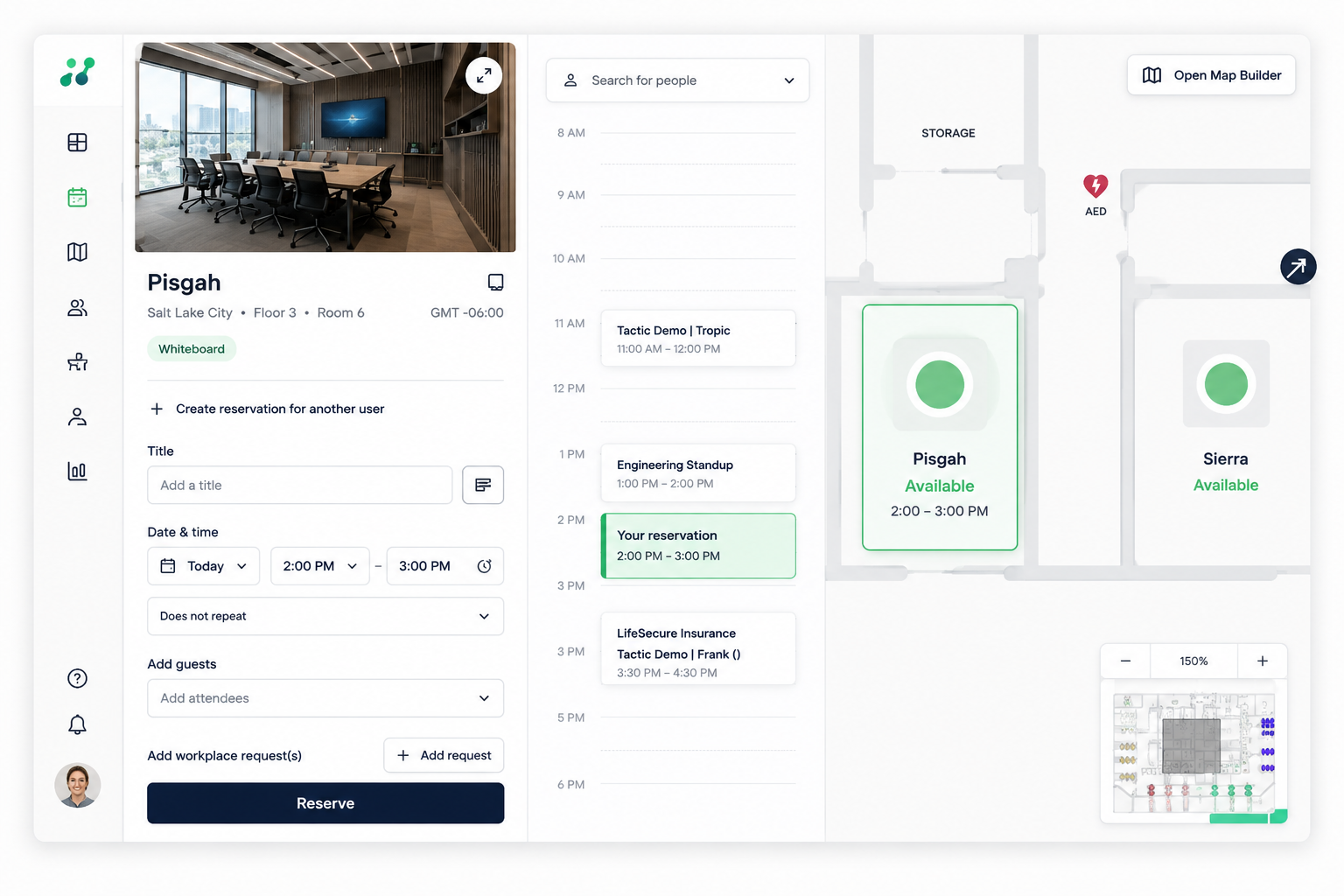
Maps make room booking easier.
Instead of choosing from a list of room names, employees can see where rooms are located in the office.
This is especially helpful when employees need to find a room near:
Interactive maps turn room booking into a more intuitive experience.
Room displays help employees see whether a room is available, booked, or in use.
They can also support quick actions like:
Room displays are useful because they connect digital booking to the physical office experience.
A room that is booked is not always a room that is used.
Room check-ins help confirm whether a meeting actually started.
If no one checks in, the room can be released for others.
This is one of the best ways to reduce phantom meetings and improve availability.
Auto-release policies help prevent rooms from staying blocked when no one shows up.
For example:
If no one checks in within 10 minutes of the meeting start time, the room becomes available again.
This helps solve one of the most frustrating office problems: rooms that are booked but empty.
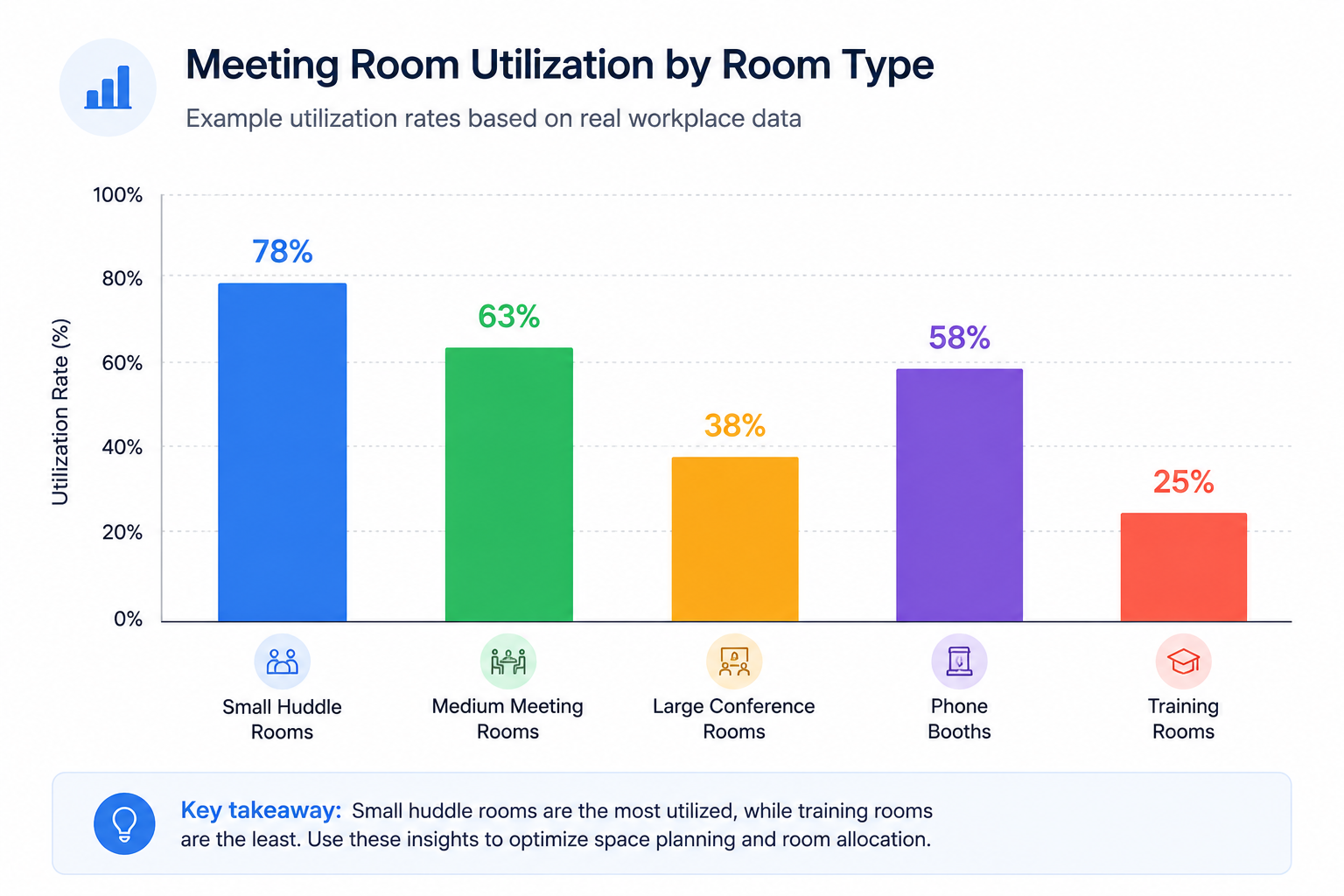
Workplace teams need to understand how rooms are being used.
Room analytics can show:
This helps companies make smarter decisions about space planning.
Companies with multiple offices need consistent room booking across locations.
A good system should make it easy to manage:
This is especially important for enterprise workplace teams.
Room booking is not isolated.
It connects to the rest of the workplace experience.
For example:
When these workflows live in separate systems, the experience becomes fragmented.
When they work together, the office becomes easier to use.
Good meeting room booking software should help reduce:
If a system does not solve these problems, it may be too basic for a hybrid workplace.
Rather than choosing based only on a feature checklist, companies should evaluate how well the software supports their actual workplace model.
Here are the most important questions to ask:
If employees use Outlook or Google Calendar, the room booking system needs to work with those tools.
Employees should be able to find and book the right room quickly.
If the experience is confusing, adoption will suffer.
Room booking should connect to the actual workplace through maps, displays, check-ins, and clear room details.
Look for check-ins, auto-release rules, and reporting on unused bookings.
Workplace teams need data to understand whether the room mix is working.
If your company has multiple offices, the system should support multi-location management.
Room booking is stronger when it connects to desk booking, visitor management, workplace requests, and analytics.
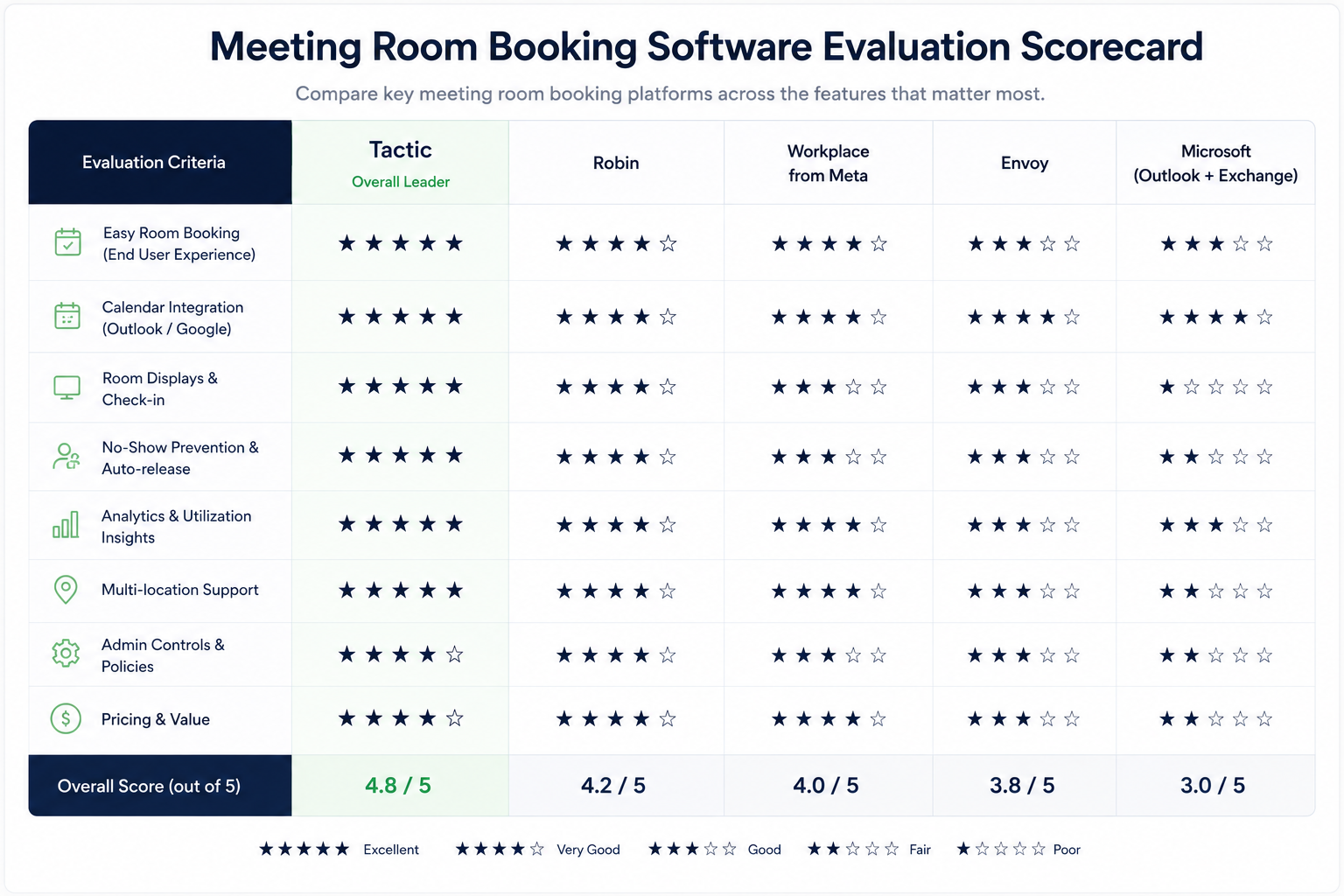
Tactic is built for companies that need room booking to work as part of the broader workplace experience.
That means room booking can connect with:
This matters because most companies are not just trying to reserve rooms.
They are trying to create an office that is easier to coordinate, easier to navigate, and easier to manage.
The best meeting room booking software for hybrid offices should make rooms easy to find, easy to book, and easy to manage.
At minimum, it should support calendar sync, room availability, capacity details, check-ins, auto-release rules, and utilization analytics.
For modern workplaces, the strongest option is usually not a standalone room scheduler.
It is a workplace management platform that connects room booking with desks, visitors, maps, analytics, and the broader employee experience.
Meeting room booking software helps employees find, reserve, and manage meeting rooms in an office.
The best meeting room booking software for hybrid offices should support calendar sync, real-time availability, room displays, check-ins, auto-release rules, and room utilization analytics.
Yes. Many meeting room booking platforms sync with Outlook so employees can book and manage rooms from their calendar.
Yes. Many platforms support Google Calendar room booking and two-way calendar sync.
Companies prevent unused room bookings with check-ins, auto-release policies, recurring meeting reviews, and room utilization analytics.
Room utilization analytics helps companies understand which rooms are used, which rooms are underused, and whether the office has the right mix of meeting spaces.

One platform for your entire workplace.