Room Booking

Meeting room booking software. Keep every meeting moving.

Find the right room, compare schedules, book one or more spaces, and add the services each meeting needs. Everything stays in sync with Outlook and Google Calendar.

Trusted by fast-growing
companies

  • A&E
  • Veeam
  • HPE
  • Comet
  • RE/MAX
  • SmartSweets
  • Northwestern University
Interactive product tour

One booking flow. Every detail handled.

Walk through the real Tactic workflows employees and workplace teams use to plan, book, coordinate, and prepare rooms.

Room booking essentials

Simple for employees. Complete for workplace teams.

Calendars, room displays, maps, and services stay connected, so booking a room just works for everyone.

01

Calendars stay aligned

Bookings and changes stay bi-directionally synced with Outlook and Google Calendar, so people can book wherever they already work.

OutlookGoogle Calendar
02

The right room is easy to find

Search by location, capacity, and amenities. Compare colleague schedules, book multiple rooms, and add the meeting details in one flow.

AmenitiesMulti-room
03

Meetings stay moving

Room displays show live status and support quick booking. Check-in and automatic release help keep availability accurate throughout the day.

Room displaysAuto-release
One live schedule

Book anywhere. Stay in sync everywhere.

Changes made in Tactic, Outlook, or Google Calendar stay bi-directionally synced. Employees can see real availability, add a title and attendees, and avoid the meeting conflicts that create hallway chaos.

  • ✓Live room availabilitySee the schedule by day, week, or month.
  • ✓Attendee schedules in contextFind a time that works before reserving.
  • ✓Video links stay connectedSupport Teams, Zoom, and Google Meet.
Google CalendarMicrosoft OutlookMicrosoft TeamsZoomGoogle Meet
TimelineWeek view
Tactic room booking panel with a colleague's live schedule
Choose a time that worksRoom and attendee schedules appear together.
Beyond the reservation

Booking reserves the room. Managed Rooms gets it ready.

Keep the reservation and the work behind it connected, without forcing employees to chase separate forms or teams.

Tactic room reservation with workplace services including AV, catering, and room setup
Managed Rooms

Add the services the meeting needs

Request AV, catering, equipment, facilities support, or a specific room setup while the reservation is being made.

AVCateringRoom setup
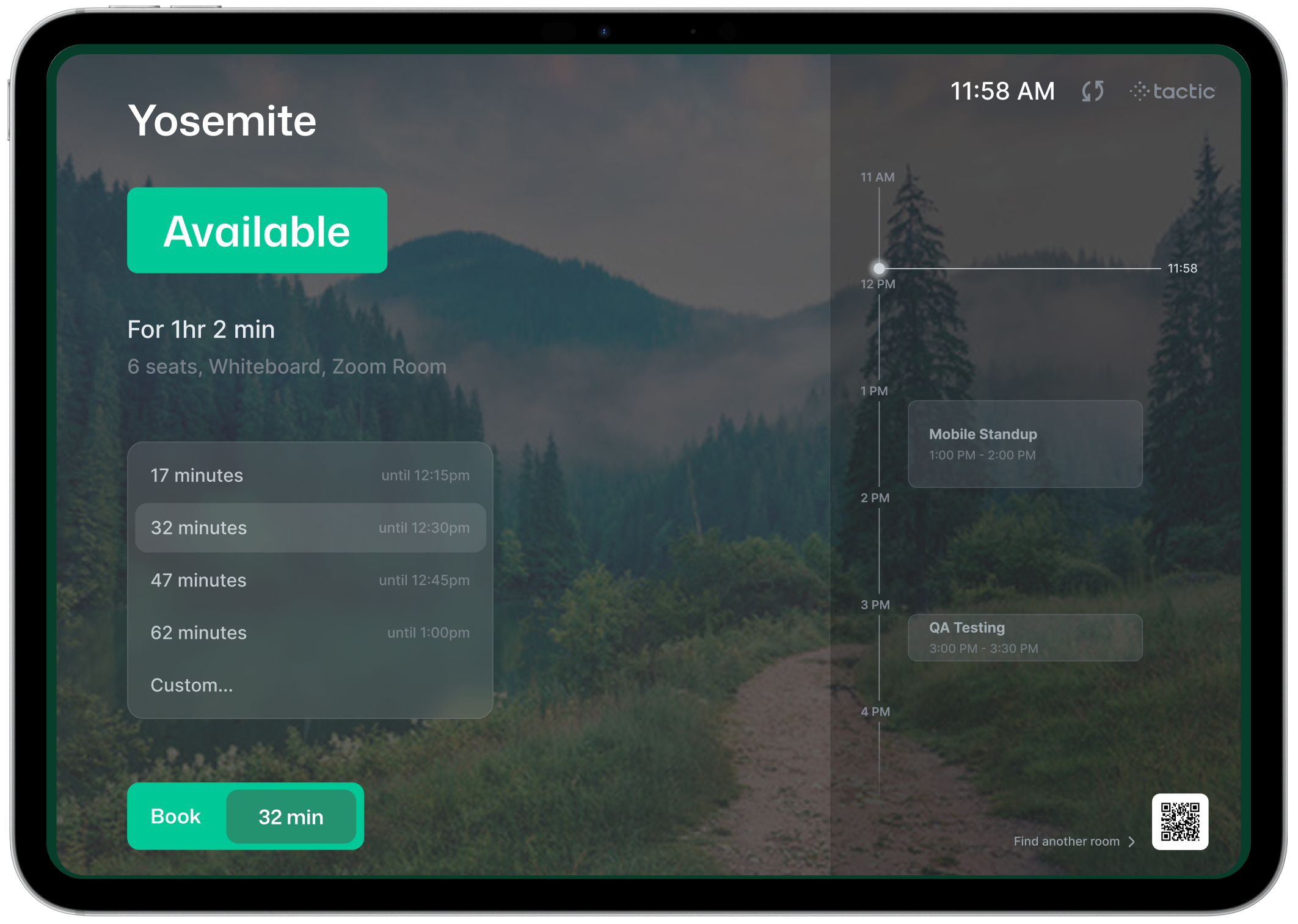
Tactic room display showing a room is available
Room Displays

Keep the hallway view current

Show live availability outside every room, support tap-to-book and check-in, and automatically release rooms that go unused.

Live statusQuick reserveCheck-in
Meeting room booking FAQ

Room booking questions, answered clearly.

Setup, Outlook and Teams, Slack and mobile, check-in, hardware, security, and reporting.

What is meeting room booking software?

Meeting room booking software lets employees find an open room and reserve it for a set time. It shows what is free right now, prevents double bookings, and frees up rooms nobody uses. Tactic brings room reservations, room displays, and workplace services together in one place.

How do admins connect Tactic to Outlook room calendars?

A Tactic admin starts the Outlook integration and a Microsoft administrator approves it. Each meeting room in Tactic is then linked to its Exchange room email address. After that, Outlook events that list the room as the location sync to Tactic, and Tactic reservations land on the shared room calendar.

Can employees book meeting rooms in Outlook or Microsoft Teams?

Yes. Adding a linked room as the location of an Outlook event creates the reservation in Tactic. In Microsoft Teams, the Tactic app opens the full interface, including office maps, team schedules, and room reservations, so people can book a space without leaving Teams.

Can people book meeting rooms from Slack or a phone?

Yes. With the Slack integration, people can reserve a meeting room, get reservation reminders, and check in straight from the message. The Tactic mobile app for iPhone and Android lets employees reserve rooms and check in from their phone, so nobody needs a laptop to grab a room.

How does automatic release work for no-show meetings?

Admins set a check-in window, measured in minutes after the start time, for meeting rooms in each building. If nobody checks in within that window, Tactic cancels the reservation and the room opens up for someone else. With the setting turned off, a missed check-in leaves the booking in place.

Where can employees check in to a meeting room?

At the room display outside the door, or remotely through Tactic, the mobile app, or Slack. When remote check-in is enabled, people can check in up to one hour before the meeting starts. Admins configure meeting room check-in separately from desk check-in.

What hardware do room displays need?

Any iPad or Android tablet with internet access, usually mounted outside the room. An admin creates the display in Tactic, picks the building, floor, and room, then links the tablet by entering a one-time code or scanning a QR code in the Tactic Station app.

Can Tactic manage meeting rooms across multiple offices?

Yes. Admins set up each building with its own floors and meeting rooms, and settings such as room check-in rules are managed per building. Employees choose the office and floor when they search, so a company with several locations can run room booking from one Tactic account.

Does Tactic support single sign-on (SSO)?

Yes. Any organization can add SSO. Tactic supports SAML providers including Okta, Microsoft Entra ID (Azure), Google, OneLogin, JumpCloud, and PingFederate, plus Google and Microsoft OAuth. A generic SAML option covers many other identity providers.

Can workplace teams see how meeting rooms are used?

Yes. Office Insights includes reporting for rooms alongside desks, parking, and visitors. Workplace teams can review room usage together with availability, check-ins, and services, which helps them spot rooms that stay busy or sit empty before changing a floor plan.

Related: Desk booking software · Managed Rooms · Visitor management

See it in your workplace

Make room booking feel effortless.

Bring calendars, room services, displays, and workplace operations into one connected experience.

Book a demo
Meeting room buying guide

Comparing meeting room software?

Compare Microsoft 365 integrations, room panels, check-ins, analytics, and rollout requirements.