
.webp)
Enterprise workplace teams need more than a simple desk booking tool.
They need software that can support multiple offices, complex permissions, hybrid schedules, meeting rooms, visitors, workplace requests, space planning, integrations, and reporting.
That is why many companies are moving toward all-in-one workplace management software.
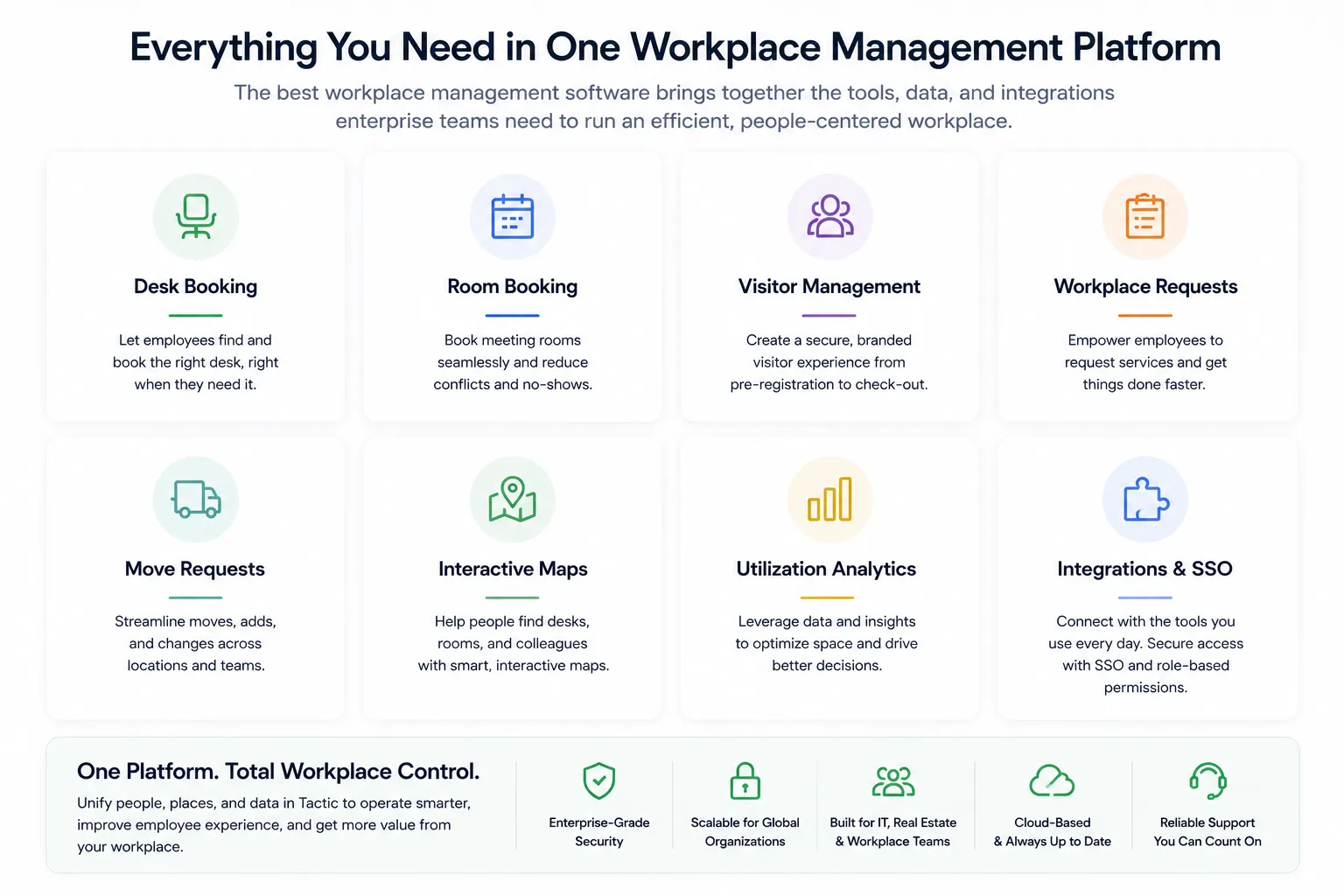
The short answer: The best workplace management software for enterprise companies should combine desk booking, room booking, interactive office maps, visitor management, workplace requests, move requests, utilization analytics, calendar integrations, SSO, directory sync, and multi-location administration in one connected platform.
For enterprise teams, the goal is not just to let employees book a desk.
The goal is to run a workplace that is easier to use, easier to manage, and easier to optimize.
Enterprise workplace management software helps companies manage the daily operations of the modern office.
It typically supports workflows like:
For smaller companies, a point solution may be enough.
For enterprise companies, workplace operations are more complex.
A global or multi-office team needs consistency, security, reporting, and flexibility across many locations.
Many companies start with one problem.
They need desk booking.
Then they need room booking.
Then visitor management.
Then workplace requests.
Then analytics.
Then maps.
Then integrations with Microsoft 365, Google Workspace, Slack, Teams, SSO, and directory sync.
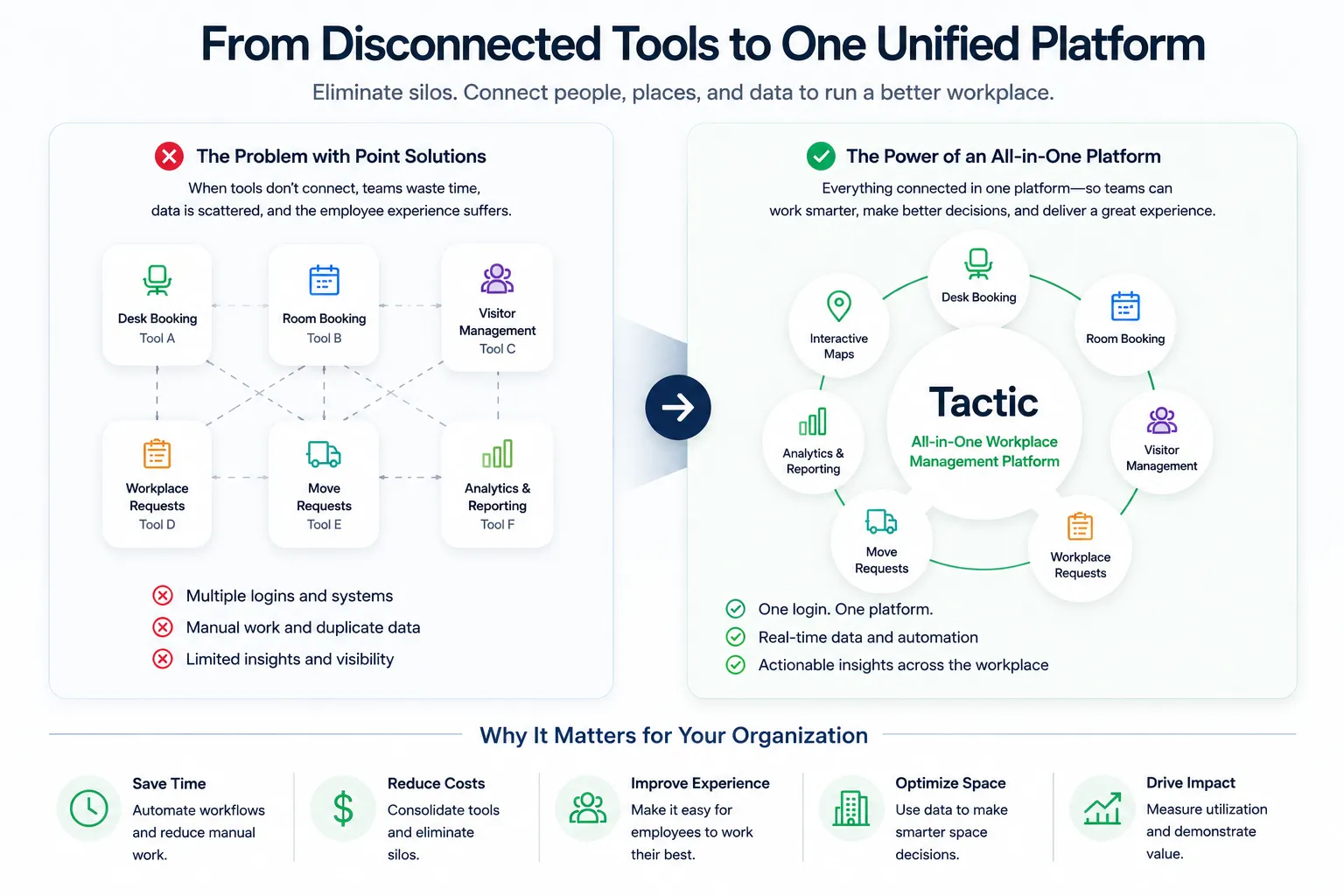
Before long, they are managing the workplace across five separate systems.
That creates problems:
An all-in-one workplace management platform solves this by connecting the core workflows in one place.
Desk booking helps employees reserve a workspace when they come into the office.
For enterprise companies, desk booking should support:
The best desk booking experience should be simple for employees and powerful enough for workplace teams.
Meeting rooms are one of the most important parts of the workplace experience.
Enterprise room booking software should support:
Room booking should not live in a silo.
It should connect to desk booking, visitors, calendars, and workplace analytics.
Maps are one of the most important parts of modern workplace management.
Employees use maps to find:
Admins use maps to manage:
For enterprise companies, maps should be easy enough for employees to use every day and structured enough for admins to manage at scale.
Visitor management helps companies manage guests, vendors, candidates, contractors, and clients.
Enterprise visitor management should support:
Visitor management is especially valuable when connected to room booking and host notifications.
For example, a client visit may involve a room reservation, a host, a visitor badge, and a digital log.
Those workflows should work together.
Enterprise offices generate constant requests.
Employees need help with:
Workplace request software gives employees a clear place to submit requests and gives workplace teams a way to track, assign, and resolve them.
This is especially important for large offices where requests can otherwise get lost in Slack, email, or informal conversations.
Enterprise workplace teams constantly manage change.
Teams grow. Departments move. Neighborhoods shift. Offices get reconfigured.
Move request workflows help companies manage:
Move requests are a natural extension of space planning.
They help companies turn space decisions into operational workflows.
Enterprise workplace decisions should be data-driven.
Workplace analytics should help teams understand:
This data helps companies decide how much space they need, which rooms are working, where employees prefer to sit, and how to improve the office experience.
Enterprise workplace management software should integrate with the systems companies already use.
Important integrations include:
The platform should fit into the existing enterprise tech stack instead of creating another disconnected system.
Enterprise teams need control.
A strong platform should support:
Enterprise readiness is not only about features.
It is about security, scalability, governance, and reliability.
There are several workplace management platforms enterprise teams may evaluate in 2026.
The right option depends on whether the company needs a lightweight desk booking tool, a visitor management solution, a full IWMS, or an all-in-one workplace management platform.
Below are common options in the market.
Best for enterprise companies that want an all-in-one workplace management platform that is still easy for employees to use.
Tactic supports the core workflows modern enterprise workplace teams need:
Tactic is a strong fit for companies that want to consolidate workplace tools without giving employees a complicated legacy system.
The platform is built around the employee experience, but still supports the operational needs of workplace, facilities, IT, HR, and real estate teams.
For enterprise companies, that balance matters.
Best for companies that need a broader IWMS or real estate and facilities management ecosystem.
SpaceIQ is now part of Eptura, a larger worktech platform. Eptura positions itself across workplace, facilities, maintenance, asset, and space management use cases.
This can be a fit for large enterprises with complex real estate and facilities requirements.
However, companies looking for a more modern, employee-friendly hybrid workplace platform may prefer an alternative focused on day-to-day workplace adoption, desk booking, room booking, requests, visitors, and maps.
Best known for visitor management and front desk workflows.
Envoy is well known in visitor management and workplace entry experiences.
It can be a good fit for organizations that prioritize guest check-in, lobby workflows, and employee-facing workplace coordination.
Companies evaluating Envoy for broader workplace management should compare the depth of desk booking, room booking, maps, workplace requests, and space planning capabilities they need.
Best for workplace scheduling, room booking, and employee experience workflows.
Robin is a recognized workplace platform with tools for hybrid scheduling, space management, meeting management, and workplace analytics. Robin’s own positioning emphasizes workplace operations, usage analysis, and planning for future changes.
Robin can be a good fit for companies focused on employee workplace scheduling and meeting room workflows.
Enterprise buyers should compare how each platform handles visitor management, workplace requests, move requests, maps, and broader operational workflows.
Best for companies focused heavily on space planning and workplace analytics.
OfficeSpace is often evaluated by companies that need space planning, workplace analytics, move management, and facilities-oriented workflows.
It can be a fit for organizations that prioritize space management and real estate planning.
Companies looking for a lighter, more employee-first platform may want to compare adoption, implementation, and day-to-day usability.
Best for space booking and scheduling across shared resources.
Skedda is commonly used for booking spaces, rooms, and shared resources.
It can work well for organizations that need flexible space scheduling.
For enterprise workplace management, buyers should compare the depth of employee experience, maps, analytics, visitor management, workplace requests, and integrations.
Point solutions usually solve one workflow well.
For example:
All-in-one workplace management software connects these workflows.
That means employees can use one platform to:
And admins can use one system to:
For enterprise companies, connected workflows are usually more valuable than disconnected tools.
Before choosing workplace management software, enterprise buyers should ask:
The best platform should support both sides of the workplace: the employee experience and the operational backend.
Tactic is built for companies that want modern workplace management without stitching together multiple tools.
It gives enterprise workplace teams a connected platform for:
That makes Tactic a strong fit for companies that want one platform to manage the workplace across people, spaces, visitors, and operations.
For enterprise organizations, the workplace is not just a floor plan.
It is a living system of employees, meetings, guests, requests, spaces, and data.
Tactic helps bring that system together.
The best workplace management software for enterprise companies in 2026 is the platform that connects the core workflows of the modern workplace: desks, rooms, maps, visitors, workplace requests, move requests, analytics, and integrations.
Some companies may choose a point solution for one narrow need.
But enterprise companies usually benefit from a connected platform that supports both employees and admins.
Tactic is a strong option for enterprises that want an all-in-one workplace management platform that is modern, flexible, and built for hybrid work.
The best workplace management software depends on the company’s needs. Enterprise teams should look for desk booking, room booking, maps, visitor management, workplace requests, move requests, analytics, integrations, SSO, directory sync, and multi-location support.
Enterprise workplace management software helps large companies manage office spaces, desks, rooms, visitors, requests, maps, analytics, and hybrid workplace operations across multiple locations.
Yes. Tactic is a workplace management platform that supports desk booking, room booking, interactive maps, visitor management, workplace requests, move requests, and utilization analytics.
Workplace management software focuses on daily workplace operations and employee experience. IWMS platforms are often broader and may include real estate, facilities, maintenance, leases, assets, and capital planning.
Enterprise companies use workplace management software to improve employee experience, manage hybrid work, consolidate workplace tools, understand utilization, support multiple offices, and make better space planning decisions.

A workplace experience platform that brings your hybrid team together.