
.webp)
What Is Neighborhood Seating? How Hybrid Teams Sit Together in the Office
One of the biggest challenges in a hybrid office is helping employees sit near the right people.
In a flexible workplace, employees may not have assigned desks. That creates more freedom, but it can also create confusion.
If people come into the office to collaborate, but cannot find their teammates, the office experience starts to break down.
That is where neighborhood seating comes in.
The short answer: Neighborhood seating is a workplace strategy where teams, departments, or groups are assigned to specific areas of the office while still allowing employees to book flexible desks within those areas.
It gives companies a balance between assigned seating and completely open hot desking.
Employees get flexibility.
Teams get proximity.
Workplace leaders get structure.
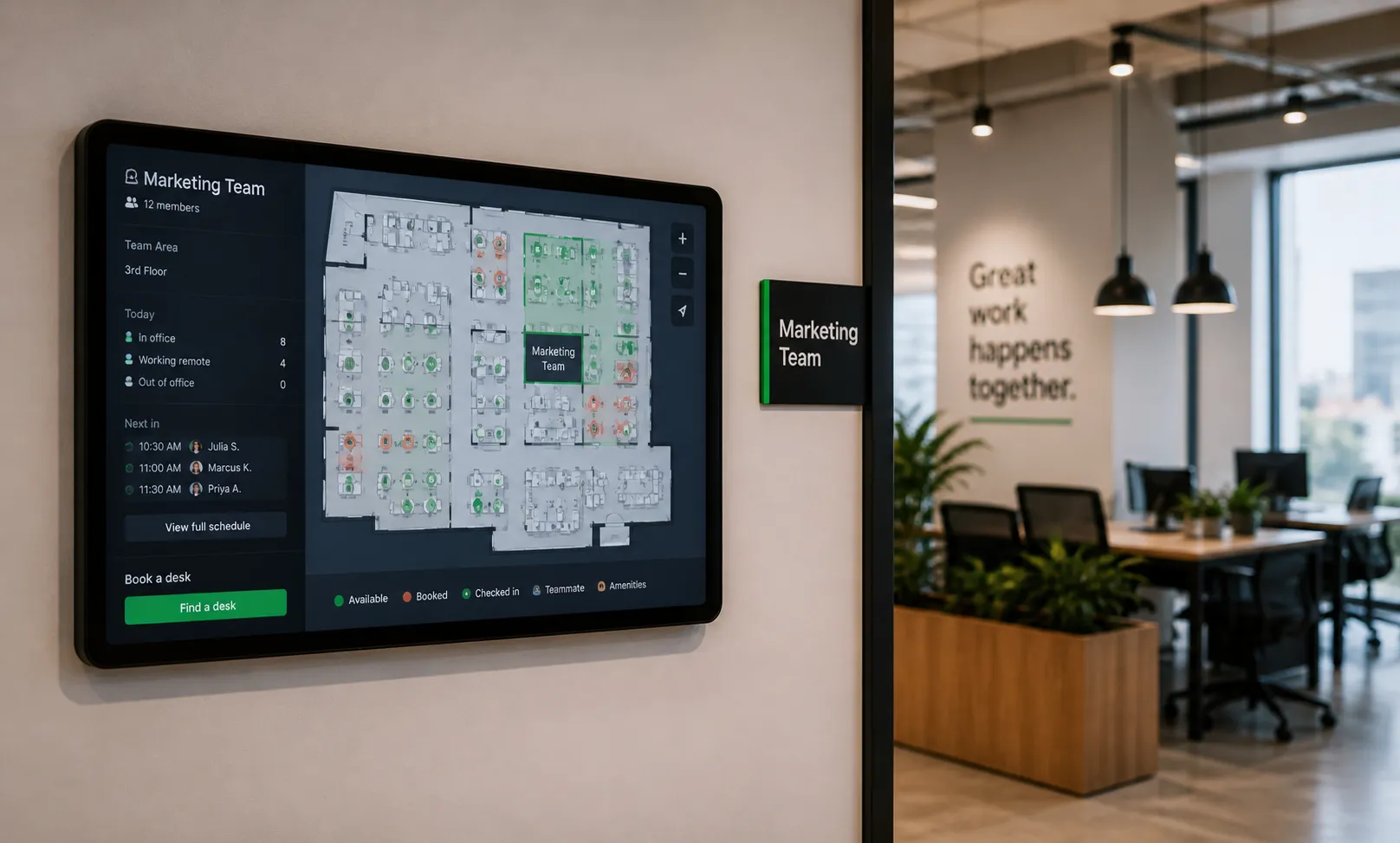
Neighborhood seating organizes an office into zones or neighborhoods.
Each neighborhood is typically associated with a team, department, function, or group.
For example:
Employees within those groups can then reserve desks in their assigned neighborhood when they come into the office.
This helps teams stay connected without requiring every employee to have a permanent desk.
Neighborhood seating has become more popular as companies move away from traditional assigned seating.
In a hybrid office, not every employee is in the office every day. That means one-to-one assigned seating can create a lot of unused space.
But completely open seating can create problems too.
Employees may not know where to sit.
Teams may end up scattered across the office.
Managers may struggle to coordinate in-person work.
Neighborhood seating gives companies a middle ground.
Assigned seating gives each employee a specific desk.
Neighborhood seating gives each team or group a specific area.
That means employees may not always sit at the exact same desk, but they usually sit near the same people.
This is helpful for hybrid companies because it preserves team structure while still reducing the number of dedicated desks.
Hot desking usually allows employees to choose any available desk.
Neighborhood seating adds more structure.
Instead of choosing from the entire office, employees may choose from desks within their team’s neighborhood.
This prevents the office from feeling random and helps employees find their teams more easily.
A typical neighborhood seating process looks like this:
The best neighborhood seating programs are flexible.
They provide structure without making the office feel overly rigid.
The biggest benefit is proximity.
Employees come into the office to collaborate, meet, and connect.
Neighborhood seating helps make that easier by keeping related teams together.
If a team has anchor days or planned collaboration days, a neighborhood gives them a predictable place to gather.
This makes hybrid coordination easier.
Companies can reduce unused assigned desks while still giving teams dedicated areas.
This improves space efficiency without making employees feel like they are competing for random desks.
Employees know where to go when they arrive.
They can find their teammates, choose a desk, and start working with less friction.
With the right workplace management software, companies can see which neighborhoods are being used, which teams need more space, and which areas may be underutilized.
This helps improve space planning over time.
Companies can structure neighborhoods in different ways.
Each team gets a specific area.
This is common for departments like sales, marketing, engineering, HR, finance, and customer success.
Employees working on a shared project sit near each other temporarily.
This can be useful for product launches, client work, or cross-functional initiatives.
Some neighborhoods are designed around the type of work being done.
For example:
Some companies combine multiple approaches.
A team may have a home neighborhood, but employees can also book other spaces depending on their needs for the day.
Neighborhood seating works well, but only if it is managed carefully.
Certain teams may come in more often than others.
If their neighborhood is too small, employees may struggle to find seats.
Other teams may come in less frequently.
Their neighborhood may sit empty most of the week.
This is why utilization data matters.
Some employees work with multiple teams.
A rigid neighborhood model can make collaboration harder if employees are locked into one area.
If employees do not understand where they can sit, the experience can become frustrating.
Clear communication and simple booking rules are important.
Do not assign neighborhoods based only on org charts.
Use data like:
This helps create neighborhoods that match actual behavior.
A neighborhood should not be planned at exactly 100% capacity.
Employees need room for schedule changes, visitors, new hires, and busy days.
Flexibility matters.
Some employees may need to sit near another team for a project or meeting.
A good system allows structure without completely limiting movement.
Neighborhoods should evolve.
If one team grows or another team comes in less often, the seating plan should be updated.
Interactive office maps make neighborhood seating much easier.
Employees should be able to quickly see:
Desk booking software makes neighborhood seating easier to manage.
It can help companies:
Without software, neighborhood seating often becomes manual and difficult to maintain.
With the right platform, it becomes a simple part of the employee experience.
Neighborhood seating is a strong fit for many hybrid companies, but it is not always necessary.
It works best when:
It may be less important for very small offices or teams that do not need to sit together.
Neighborhood seating is a hybrid office strategy that assigns teams or groups to specific areas while still allowing employees to use flexible desks.
It helps companies balance flexibility, team coordination, and space efficiency.
For hybrid workplaces, neighborhood seating can make the office easier to use, easier to manage, and better aligned with how people actually work.
The best neighborhood seating programs combine clear policies, interactive maps, desk booking, and utilization data.
Neighborhood seating is a workplace strategy where teams or groups are assigned to specific areas of the office while employees still use flexible desks within those areas.
Assigned seating gives each employee a specific desk. Neighborhood seating gives teams a shared area, allowing employees to choose desks within that zone.
No. Hot desking usually allows employees to choose any available desk. Neighborhood seating adds more structure by organizing desks around teams, departments, or work styles.
Companies use office neighborhoods to help teams sit near each other, improve hybrid coordination, reduce unused desks, and make the office easier to navigate.
Desk booking software and workplace management platforms help manage office neighborhoods with interactive maps, booking rules, team zones, check-ins, and utilization analytics.

A workplace experience platform that brings your hybrid team together.