
.webp)
Enterprise workplace teams are being asked to do more with less.
They need to support hybrid work, manage office space, coordinate employees, handle visitors, resolve workplace requests, track utilization, and create a better employee experience across multiple locations.
For many companies, that work is spread across too many tools.
A desk booking tool here. A room booking system there. A visitor management app at the front desk. A ticketing process in email. Space planning in spreadsheets. Utilization data in another dashboard.
That is why companies are moving toward all-in-one workplace management platforms.
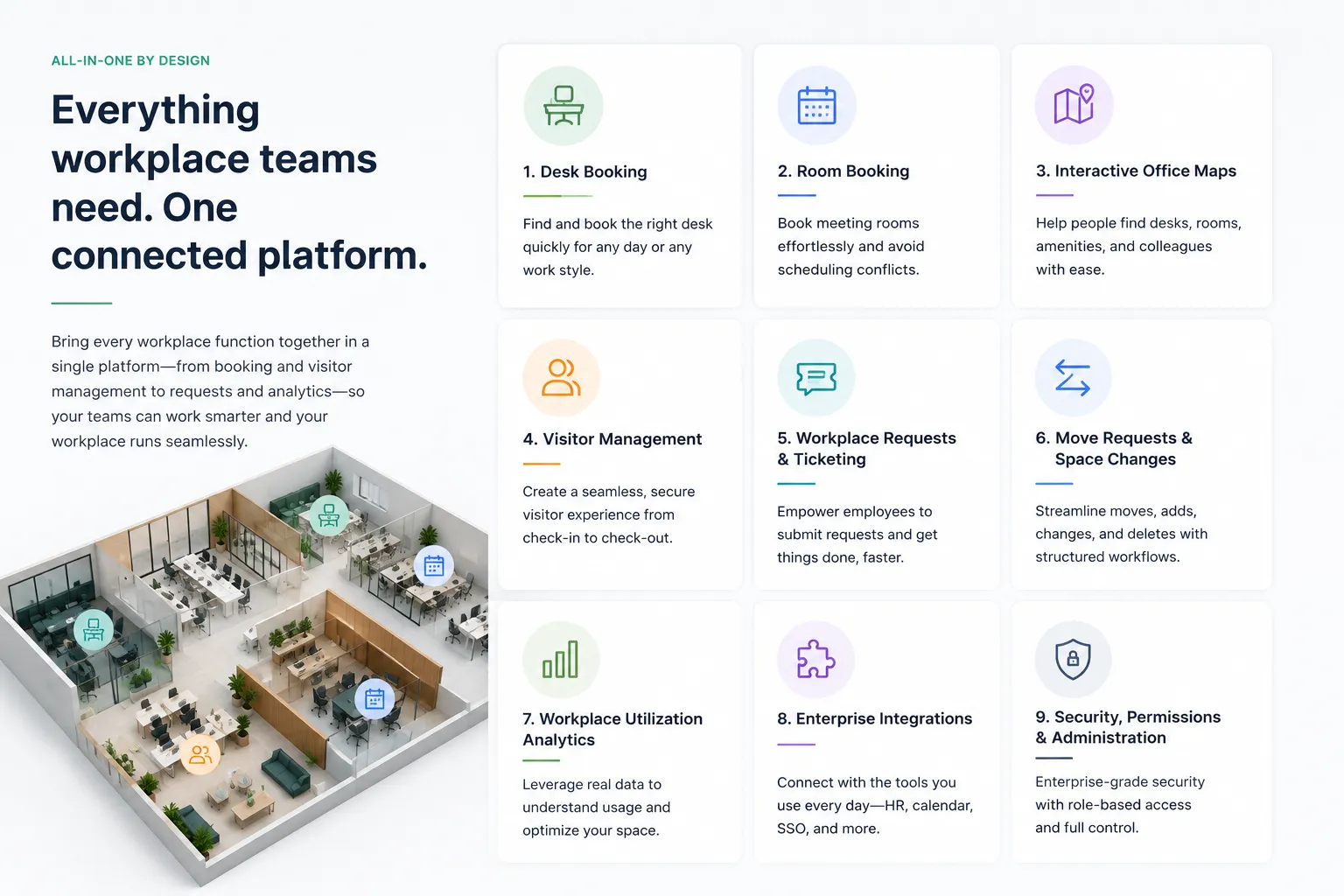
The short answer: An all-in-one workplace management platform is software that helps companies manage desks, meeting rooms, office maps, visitors, workplace requests, move requests, space planning, and utilization analytics in one connected system.
The goal is not just to manage office space.
The goal is to make the workplace easier to use, easier to operate, and easier to optimize.
An all-in-one workplace management platform connects the core workflows that keep an office running.
Instead of managing each workplace function in a separate tool, companies use one platform to support employees, admins, facilities teams, workplace teams, IT, HR, and real estate leaders.
A strong platform can help companies manage:
For enterprise companies, the value is in the connection between these workflows.
A desk booking system is useful.
A room booking system is useful.
A visitor management system is useful.
But when all of those workflows work together, workplace teams get better visibility and employees get a simpler experience.
Disconnected tools create friction.
Employees may need one system to book a desk, another to reserve a room, another to invite a visitor, and another to submit a workplace request.
Admins may need to update maps in one place, manage users in another, pull utilization data from another, and track requests in a separate system.
This creates problems:
An all-in-one platform reduces that fragmentation.
It gives employees one place to interact with the workplace and gives workplace teams one place to manage it.
Desk booking helps employees reserve a workspace when they come into the office.
For hybrid companies, this is essential.
Employees should be able to find desks by:
Admins should be able to manage desk rules, assignments, neighborhoods, check-ins, and utilization data.
Meeting rooms are one of the most important parts of the office experience.
Room booking should support:
Room booking is stronger when it connects to desks, visitors, maps, and calendars.
Maps help employees understand the workplace.
A good map should help people find:
For admins, maps also support space planning, resource management, utilization analysis, and office changes.
Modern workplace maps should be useful for both employees and workplace teams.
Visitor management helps companies manage guests, vendors, candidates, contractors, and clients.
A connected platform can support:
Visitor management becomes more powerful when it connects to room booking, host notifications, and workplace security workflows.
Employees need a simple way to request help with office issues.
Workplace requests may include:
A workplace request system helps employees submit requests and helps teams track, assign, and resolve them.
Enterprise workplaces are always changing.
Teams grow. Departments move. Floors get reconfigured. Seating neighborhoods shift.
Move request workflows help workplace teams manage:
This connects space planning to real operational action.
Workplace decisions should be based on real data.
Utilization analytics can show:
This helps companies understand what is working, what is underused, and where to make improvements.
An all-in-one workplace management platform should work with the tools companies already use.
Important integrations often include:
Integrations help the platform fit into existing employee workflows instead of forcing everyone into a new process.
Point solutions solve one narrow problem.
For example:
An all-in-one workplace management platform connects those workflows.
That means employees can use one system to book a desk, reserve a room, find a teammate, invite a visitor, and submit a workplace request.
Admins can use one platform to manage resources, maps, policies, requests, visitors, and utilization data.
For enterprise companies, the connected platform approach is often more scalable.
An IWMS, or integrated workplace management system, is often a broader real estate and facilities management system.
IWMS platforms may include modules for:
Workplace management software is usually more focused on the daily employee and workplace operations experience.
That includes:
Some companies need a full IWMS.
Others need a modern workplace management platform that employees will actually use every day.
Enterprise companies need workplace software that can support complexity without creating a bad employee experience.
They need:
The best platform should support enterprise requirements while still feeling simple for employees.
That balance is important.
If employees do not use the system, workplace teams do not get accurate data.
If admins cannot manage it at scale, the platform becomes difficult to maintain.
Tactic is built as a modern workplace management platform for companies that want to connect the core workflows of the office.
Tactic supports:
This makes Tactic a strong fit for organizations that want an all-in-one workplace management platform that supports enterprise needs without feeling like old-school enterprise software.
An all-in-one workplace management platform helps companies manage desks, rooms, visitors, requests, maps, space planning, and analytics in one connected system.
For enterprise teams, this matters because the modern workplace is not managed through one workflow.
It is managed through many connected workflows.
The right platform helps employees use the office more easily while giving workplace teams the visibility, controls, and data they need to operate smarter.
An all-in-one workplace management platform is software that helps companies manage desks, rooms, visitors, workplace requests, office maps, move requests, space planning, and utilization analytics in one system.
It should include desk booking, room booking, interactive maps, visitor management, workplace requests, move requests, analytics, integrations, permissions, and multi-location support.
Enterprise companies use workplace management software to manage hybrid work, improve employee experience, consolidate tools, understand utilization, and operate multiple offices more efficiently.
IWMS platforms often focus on broader real estate and facilities management. Workplace management software focuses more on daily workplace operations, employee experience, hybrid work, desks, rooms, visitors, requests, and analytics.
Yes. Tactic supports desk booking, room booking, maps, visitor management, workplace requests, move requests, space planning, and utilization analytics.

A workplace experience platform that brings your hybrid team together.