
.webp)

Enterprise workplace teams often start with one simple need.
They need a desk booking tool.
Then they need room booking.
Then visitor management.
Then workplace requests.
Then move management.
Then space planning.
Then utilization analytics.
Before long, the workplace is running on a patchwork of disconnected point solutions.
The short answer: Enterprise workplace teams are moving away from point solutions because disconnected tools create fragmented data, poor employee experience, duplicate admin work, inconsistent workflows, and limited visibility across offices.
As hybrid work becomes more complex, companies need connected workplace management platforms that bring desks, rooms, visitors, requests, maps, and analytics together.
A workplace point solution is software built to solve one specific workplace problem.
Examples include:
Point solutions can be useful.
They often solve a narrow problem quickly.
But for enterprise companies, too many point solutions can create more complexity than they remove.
A single point solution may work well.
The problem happens when every workplace workflow lives in a different system.
Employees may need to learn multiple tools.
Admins may need to manage multiple platforms.
Leaders may need to pull reports from several dashboards.
Data may not line up across systems.
Over time, this creates operational drag.
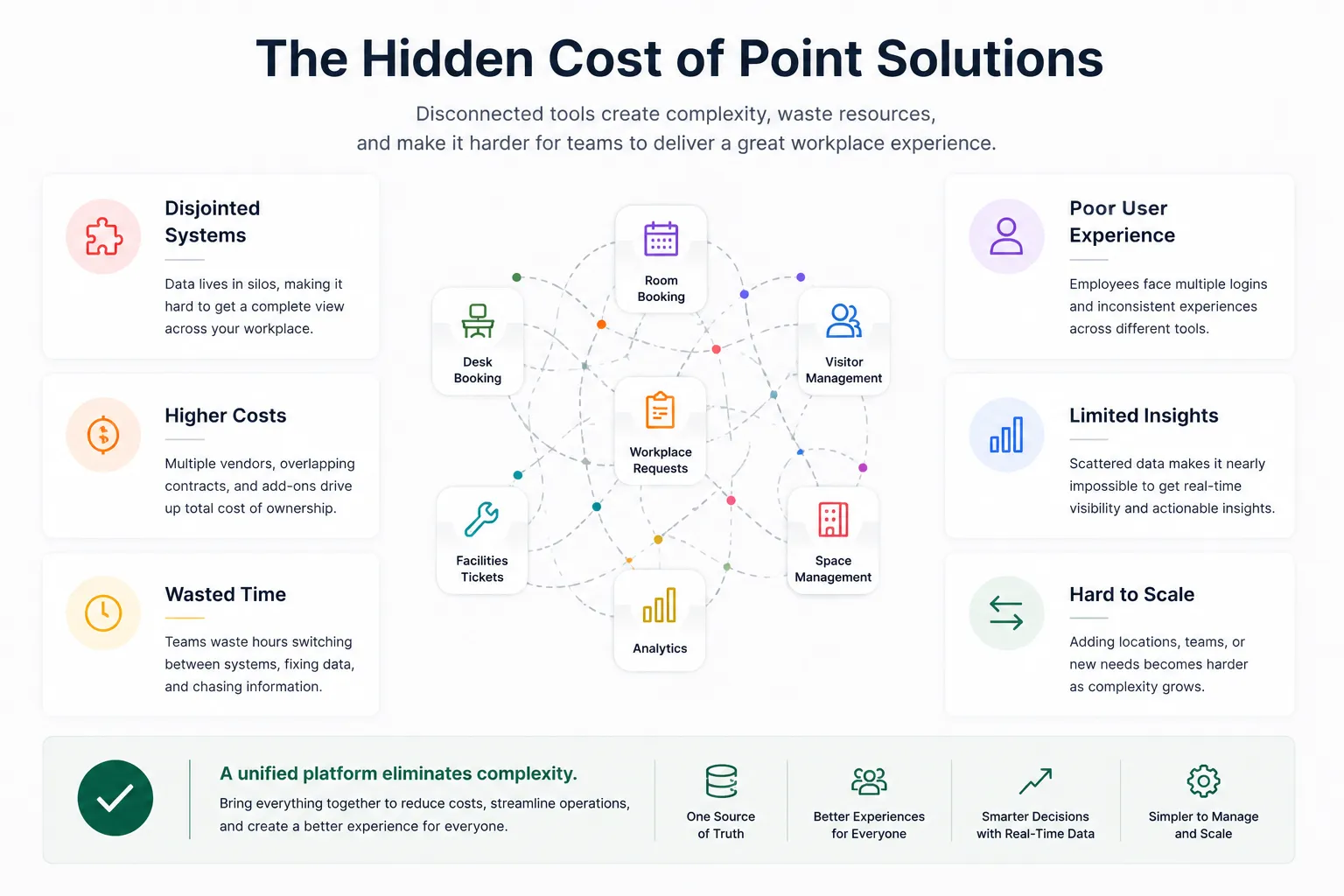
Employees do not think in software categories.
They just want to use the office.
They want to:
If each action requires a different tool, the workplace feels harder to use.
That hurts adoption.
Disconnected tools often require admins to repeat the same work in multiple systems.
For example:
This is inefficient and difficult to scale.
Point solutions often create data silos.
A desk booking tool may show desk usage.
A room booking tool may show meeting room usage.
A visitor management tool may show guest volume.
A workplace request tool may show facilities issues.
But if those systems do not connect, leaders do not get a complete view of the workplace.
If workplace tools are hard to find or hard to use, employees avoid them.
That creates a data problem.
If employees do not book desks, check into rooms, or submit requests through the right system, workplace teams cannot trust the data.
The best platform is the one employees actually use.
Enterprise companies need security, permissions, integrations, and controls.
Managing those requirements across several point solutions can be difficult.
Each system may have its own:
A connected platform can simplify governance.
Enterprise leaders need to understand how offices are being used.
They need answers to questions like:
Disconnected tools make these answers harder to find.
Enterprise workplace teams are consolidating tools because the modern office is connected.
Desk booking connects to attendance.
Room booking connects to meetings.
Visitor management connects to hosts and rooms.
Workplace requests connect to facilities and employee experience.
Maps connect everything.
Analytics ties it all together.
When those workflows live in one platform, companies can operate with more clarity.
An all-in-one workplace management platform helps companies:
The goal is not just fewer tools.
The goal is better workplace operations.
Imagine a client is visiting the office.
In a disconnected setup, the employee may need to:
In a connected workplace platform, those workflows can live together.
The employee can reserve the room, invite the visitor, find nearby desks, and submit a workplace request from one place.
That is a better experience for employees and a better workflow for admins.
Hybrid work made workplace operations more dynamic.
Employees are not always in the office.
Rooms are used differently.
Desk demand changes by day.
Teams coordinate around anchor days.
Visitors may come in for specific collaboration moments.
Workplace requests may vary by floor and location.
A fragmented toolset makes this harder to manage.
A connected platform gives workplace teams a clearer view of what is happening.
Point solutions are best when:
All-in-one workplace management is better when:
For enterprise companies, the second scenario is becoming more common.
Enterprise teams should look for a platform that includes:
The platform should be broad enough for enterprise operations and simple enough for employees.
Tactic is built for companies that want to move beyond disconnected workplace tools.
It connects core workplace workflows like:
This helps workplace teams manage the office in one connected system while giving employees a simpler way to use the workplace.
For enterprise companies, that combination matters.
It reduces complexity without sacrificing the workflows workplace teams need.
Enterprise workplace teams are moving away from point solutions because disconnected tools create fragmented experiences, scattered data, duplicate admin work, and limited visibility.
As hybrid work becomes more complex, companies need connected workplace management platforms that bring desks, rooms, visitors, requests, maps, and analytics together.
For enterprise teams, the future is not another standalone tool.
It is a connected workplace platform employees can use and admins can trust.
A workplace point solution is software designed to solve one specific problem, such as desk booking, room booking, visitor management, ticketing, or space planning.
Too many point solutions can create fragmented data, poor employee experience, duplicate admin work, inconsistent workflows, and harder reporting.
The alternative is an all-in-one workplace management platform that connects desks, rooms, visitors, requests, maps, space planning, and analytics.
Enterprise companies need connected workplace software to manage multiple offices, support hybrid work, improve employee adoption, simplify administration, and make better space decisions.
Yes. Tactic brings together desk booking, room booking, visitor management, workplace requests, move requests, maps, and analytics in one connected workplace platform.

A workplace experience platform that brings your hybrid team together.