
.webp)

Choosing workplace management software is no longer a simple facilities decision.
Enterprise buyers are not just looking for a desk booking tool.
They are trying to solve a bigger problem: how to operate a modern workplace across people, spaces, visitors, requests, maps, integrations, and data.
That means the evaluation process needs to be broader than a feature checklist.
A platform may look good in a demo, but the real question is whether it can support the way your employees, admins, workplace teams, IT teams, HR teams, facilities teams, and real estate leaders actually work.
The short answer: Enterprise buyers should evaluate workplace management software based on employee adoption, desk booking, room booking, interactive maps, visitor management, workplace requests, move requests, utilization analytics, integrations, security, permissions, scalability, implementation support, and the ability to connect workplace workflows in one platform.
The best platform is not just the one with the most features.
It is the one employees will actually use and workplace teams can actually manage.
Hybrid work changed the workplace software category.
Before, companies often evaluated tools for one specific need:
Now those workflows are connected.
An employee may come into the office, book a desk, reserve a meeting room, invite a visitor, submit a room setup request, use a map to find the space, and check in through a calendar or workplace app.
A workplace team may need to manage all of that across multiple offices, floors, teams, permissions, calendars, and employee groups.
That is why enterprise buyers should evaluate workplace management software as an operating layer for the office, not just a booking tool.
Before comparing vendors, define the actual problem.
Are you trying to:
The answer matters.
If the problem is narrow, a point solution may be enough.
If the problem spans desks, rooms, visitors, requests, maps, analytics, and enterprise integrations, you likely need a broader workplace management platform.
Enterprise software often fails when employees do not use it.
That is especially true for workplace management.
Employees are the source of much of the data workplace teams need. If employees do not book desks, check into rooms, invite visitors properly, or submit requests through the right process, the data becomes unreliable.
A strong employee experience should make it easy to:
The platform should feel simple enough that employees do not need heavy training.
If the employee experience is clunky, adoption will suffer.
And if adoption suffers, the platform will not deliver reliable workplace data.
Desk booking is important, but it is only one part of enterprise workplace management.
A desk booking-only tool may help employees reserve seats, but it may not solve broader workplace operations.
Enterprise teams should ask:
Desk booking should connect to maps, team coordination, utilization, and workplace planning.
Otherwise, it becomes another isolated tool.
Meeting rooms are one of the most common sources of office frustration.
Employees may complain that every room is booked, even when rooms are empty. That usually means the company has a room management problem, not necessarily a room shortage.
Enterprise buyers should look for:
Room booking should work with the tools employees already use.
It should also help workplace teams understand actual room usage, not just scheduled bookings.
Office maps should not just be static diagrams.
They should be part of the employee experience and the admin experience.
Employees should be able to use maps to find:
Admins should be able to use maps to manage:
For enterprise companies, maps are especially important because offices often include multiple floors, buildings, and locations.
A strong map experience can make the workplace easier to understand and easier to manage.
Visitor management is often treated as a separate front desk tool.
But in the real office, visitor management connects to the broader workplace.
A visitor may need:
Enterprise buyers should evaluate whether visitor management can connect naturally to workplace workflows.
For example:
Can a host invite a visitor for a meeting?
Can the visitor check in smoothly?
Can the host receive a notification?
Can the front desk manage visitors across locations?
Can admins access visitor logs when needed?
Visitor management is part of the workplace experience, not just a reception process.
Workplace requests are one of the most underrated parts of enterprise workplace management.
Employees need a clear way to ask for help with:
If requests are handled through Slack, email, or hallway conversations, issues get lost.
A workplace request system should help teams:
This matters because employee experience is often shaped by small operational details.
Enterprise workplaces are always changing.
Teams grow. Departments shift. Floors get reconfigured. Employees move. Neighborhoods change.
Move request workflows help companies manage those changes in a structured way.
Enterprise buyers should ask:
Move management connects space planning to real workplace operations.
If your company is constantly adjusting space, this should be part of the evaluation.
Workplace analytics should help companies understand how the office is actually being used.
But not all utilization data is equal.
Badge data can show who entered a building, but not where they worked.
Calendar data can show which rooms were booked, but not whether they were used.
Desk bookings can show intent, but not always actual attendance.
Enterprise buyers should look for analytics that connect multiple signals, such as:
The goal is not just reporting.
The goal is better decision-making.
Workplace software needs to fit into the systems your company already uses.
Important integrations may include:
Integrations matter because they reduce friction.
Employees should not have to abandon the tools they already use.
Admins should not have to manually manage users, calendars, or permissions across disconnected systems.
Enterprise buyers should involve IT and security teams early.
A workplace management platform may touch employee data, visitor data, calendar data, office maps, usage analytics, and identity systems.
Important questions include:
Enterprise readiness is not just about having features.
It is about supporting secure, scalable operations.
A workplace management platform touches real office operations.
Implementation matters.
Enterprise buyers should ask:
The best platform is not just software.
It is a partner that helps the company launch successfully.
Enterprise companies often start with one office or one use case.
But the platform should be able to scale.
Ask whether it can support:
A platform that works for one office but breaks at scale may create problems later.
Some companies prefer point solutions because they solve one problem quickly.
That can make sense in certain cases.
But enterprise teams should consider the long-term cost of disconnected tools.
Point solutions can create:
An all-in-one workplace management platform can connect the core workflows in one system.
That is especially valuable when the company needs desks, rooms, visitors, maps, requests, moves, and analytics to work together.
Use this checklist when comparing vendors:
The best platform should score well across both employee experience and enterprise operations.
A demo can make any product look polished.
Ask how the system works after launch, how employees adopt it, how admins manage changes, and how support works when real office complexity appears.
If your company only needs one workflow, a point solution may be fine.
But if your workplace problems span desks, rooms, visitors, requests, maps, and analytics, a point solution may create more fragmentation.
If employees do not use the platform, the data will not be reliable.
Choose software that employees can understand quickly.
Maps are often the difference between a tool employees ignore and a platform they actually use.
The workplace is physical. The software should help people understand that physical environment.
Analytics should not be a dashboard added later.
Utilization data should be part of the platform’s core value.
Tactic is built for companies that need more than a single workplace tool.
It brings together:
Tactic is designed to support enterprise workplace teams while still giving employees a simple, modern experience.
That balance matters.
Workplace software needs to be powerful enough for admins and easy enough for employees.
Tactic helps connect both sides.
Enterprise buyers should evaluate workplace management software based on more than features.
They should look at employee adoption, enterprise scalability, security, integrations, maps, desk booking, room booking, visitor management, workplace requests, move requests, analytics, and implementation support.
The best workplace management platform should help employees use the office more easily and help workplace teams manage it with better visibility.
For enterprise companies, the right platform is not just a tool.
It is the system that helps the workplace run.
Use this checklist when comparing vendors:
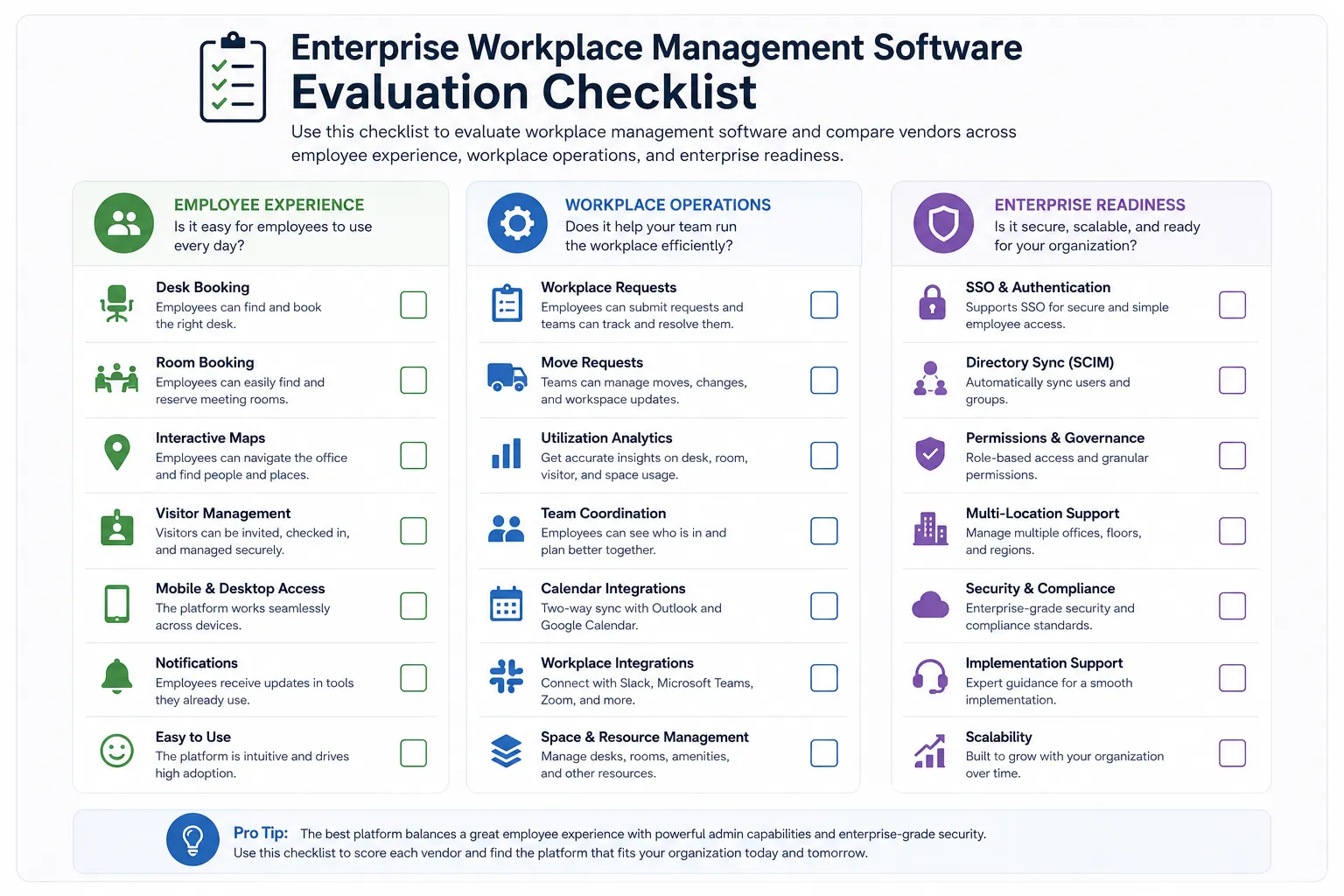
Enterprise buyers should look for desk booking, room booking, interactive maps, visitor management, workplace requests, move requests, utilization analytics, calendar integrations, SSO, directory sync, permissions, and multi-location support.
Usually no. Desk booking is important, but enterprise workplace management often also requires room booking, maps, visitor management, requests, move workflows, integrations, and analytics.
Interactive maps help employees find desks, rooms, teammates, amenities, and visitor areas. They also help admins manage resources, floors, zones, and utilization.
Common integrations include Outlook, Google Calendar, Microsoft Teams, Slack, SSO, directory sync, SCIM, HRIS systems, and employee directories.
Companies should compare vendors based on employee experience, admin controls, platform breadth, integrations, security, analytics, implementation support, and ability to scale across locations.

A workplace experience platform that brings your hybrid team together.