


To book a flexible meeting room, choose the right space and layout, protect setup and reset time, attach catering or AV requests, and confirm who owns each service. For divisible rooms, also test that bookings for individual sections and the combined space cannot conflict.
A meeting starts at 10 a.m. The room needs to be ready before then.
Someone has to move the partition, arrange the tables, test the microphones and deliver the coffee. After everyone leaves, the space needs to be reset for the next booking. If the reservation only covers the time people spend in the meeting, the facilities team is left to work out the rest.
Booking a flexible meeting room means coordinating three things: the space being used, the time needed to prepare it, and the services that make the meeting work. Here is how to put those pieces together, including what to check when a room can be divided or combined.
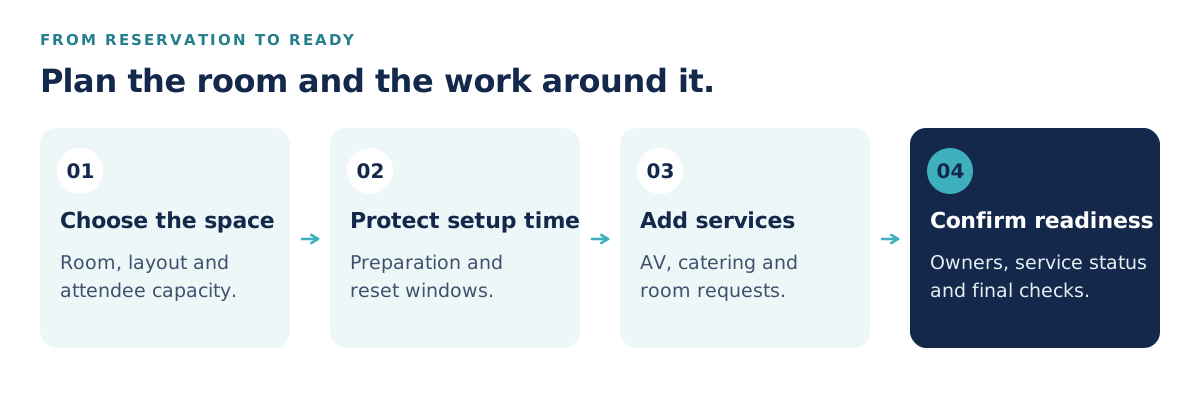
Consider an example: an eight-person workshop from 10 a.m. to noon. It needs a classroom layout, a screen and microphone, coffee before arrival, and time to clear the room afterward. The team needs a room that supports the requested layout, with enough time to prepare it before anyone arrives.
Write down what must be ready, when it must be ready, and who will handle it. For this example, the workplace team allows 30 minutes for preparation and 15 minutes for cleanup. Those are planning choices for this meeting, not universal standards.
| Part of the booking | Example requirement |
|---|---|
| Space | A room with approved capacity for the requested layout |
| Meeting | 10 a.m.–noon; 8 attendees |
| Preparation | 9:30–10 a.m.; classroom layout and AV check |
| Catering | Coffee ready at 9:50 a.m.; collection after noon |
| Reset | Noon–12:15 p.m.; clear catering and restore the usual layout |
| Room unavailable to other bookings | 9:30 a.m.–12:15 p.m. |
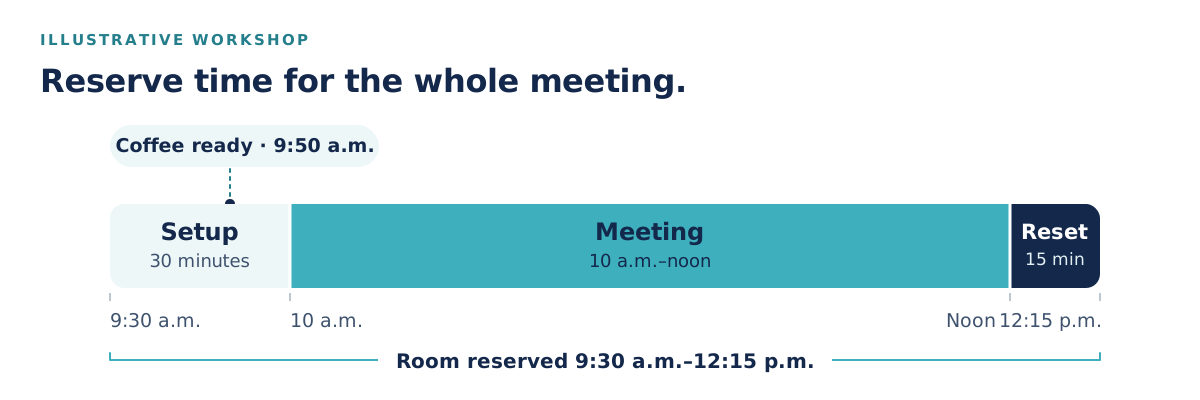
The meeting invitation can still say 10 a.m. The room's operational schedule needs to account for the work on either side.
Divisible rooms introduce a specific booking problem. Room A, room B and combined room A+B represent overlapping space. They cannot be treated as three independent rooms.
This is often called a parent-child room relationship: the combined room is the parent, and the smaller sections are its children. When evaluating booking software, ask to see these rules demonstrated:
| Reservation made | What should become unavailable | What can remain available |
|---|---|---|
| Room A | Room A and combined room A+B | Room B |
| Room B | Room B and combined room A+B | Room A |
| Combined room A+B | Room A, room B and A+B | Other, separate rooms |
Run the demonstration from every booking channel employees use. A rule that works in a booking app but can be bypassed in a calendar still leaves a conflict to resolve.
Also distinguish this from booking several rooms for one meeting. Reserving a presentation room and a separate breakout room is a multi-room booking. Automatically preventing conflicts between a combined room and its sections requires an additional relationship between those spaces. Ask the vendor to demonstrate both if your workplace needs both.
Room capacity depends on how the space is arranged. A theater layout, a classroom layout and a boardroom layout may fit different numbers of people. Record the approved capacity and equipment for each arrangement with your facilities team.
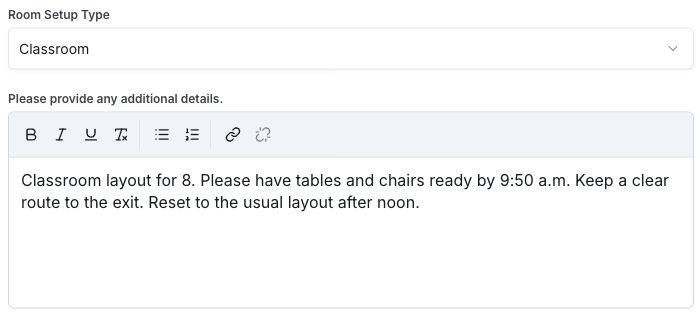
A useful setup request includes the layout name, attendee count, any furniture changes, and the time the room must be ready. A simple diagram can make an unfamiliar arrangement much easier to understand. In the Tactic demo, a configured Room Setup request includes a layout selector and space for instructions. The example below pairs a classroom layout with a ready-by time and reset instructions.
Protect setup and reset time in the booking schedule. In the Tactic demo shown, the reservation form has Before and After buffer controls. In the example shown, a 10 a.m.–noon meeting with 30 minutes before and 15 minutes after displays a room-blocking window of 9:30 a.m.–12:15 p.m., while leaving the meeting time unchanged.

During your rollout, test that these protected periods are respected across the booking channels your employees use. For combined spaces, include each affected section in that test.
Avoid a single buffer for every meeting unless it reflects how your office works. A laptop presentation in the usual layout and a catered workshop with a partition change create different amounts of work.
The host should not have to reconstruct the meeting in separate emails to catering, IT and facilities.
Tactic's room booking lets employees find spaces by location, capacity and amenities, book one or more rooms, and request AV, catering, equipment or room setup during the reservation.
With the relevant request types configured in your workspace, the flow is:
Tactic includes the reservation's date, time and location with the request. The Workplace Requests guide covers this flow and how administrators create request types.
Make the description specific enough for someone to act on. “Catering needed” leaves several questions. “Coffee for 8, ready outside the meeting room at 9:50 a.m.; host will confirm dietary requirements by Wednesday” gives the team a useful starting point. Use the same approach for AV: name the equipment, the intended use and the time it needs to be tested.
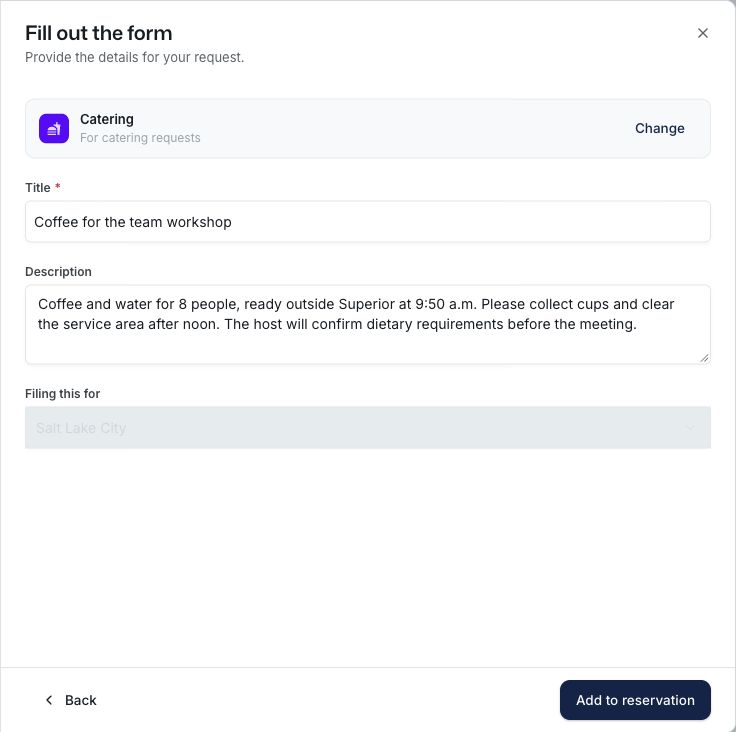
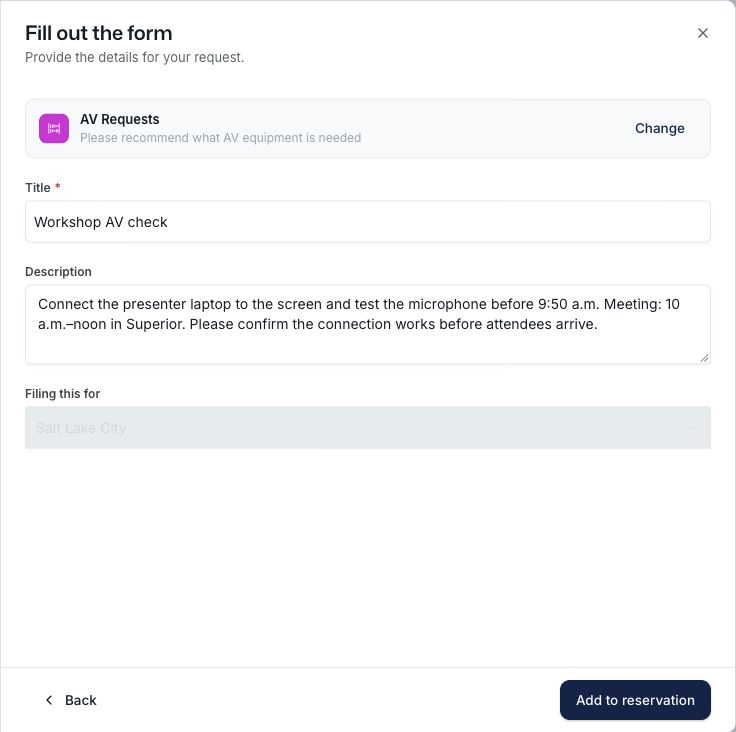
Product screenshots show example forms in the Tactic demo. Request fields and approval steps depend on your workspace configuration.
Different requests may go to different people. Facilities might handle the partition and furniture; IT might test the microphone; a catering team might arrange delivery and collection. Define who reviews each request type and who steps in when that person is away.
In Tactic Workplace Requests, request types have designated managers. Managers and admins can assign an owner, track the status, and keep comments with the request. A standard member's request starts unassigned, so include that assignment step in your team's process.
Set practical service deadlines as well. Decide how much notice catering needs, when the final headcount is due, and how late a layout can change. Explain what happens when a host asks after the cutoff: who reviews the request and how the host learns whether it can be fulfilled.
Keep the room’s booking status and the service’s readiness separate. If a request type requires approval, explain when the reservation becomes confirmed. The service owner still needs to confirm that the requested work can be done.
Meetings move. The process needs to keep working when a host changes the time, switches rooms or cancels after catering has been ordered.
Tactic supports connected Outlook and Google Calendar workflows. For Outlook room calendars, an administrator links the room resources through the organization integration; the setup guide explains the connection. Confirm that room restrictions are configured consistently before relying on both booking channels.
For every change, review the room, preparation window and service requests together. Moving a meeting by an hour may affect staff availability or food delivery even when the new room time is free.
Before rollout, test what actually happens to attached requests when a reservation changes. Does the service team see the new time? Does a cancellation close the request, notify an owner, or require a separate action? Document the behavior and assign any remaining steps. Do not assume that canceling a calendar invitation also cancels a supplier order.
Use a test booking to walk through the work from the host's request to the room's reset. Check that:
Then ask the people preparing the room to review the process. They will often spot the missing detail: a delivery location, a furniture storage area, or a gap between the room becoming free and the next host arriving.
No. Multi-room booking reserves several spaces for one event. Combination-room booking also needs rules that prevent the combined space and its smaller sections from being reserved at conflicting times.
Base it on the work required. Walk through common layouts with the team that prepares them, then set preparation and reset windows that reflect those tasks. Review them when late starts or rushed turnovers reveal a mismatch.
Yes. You can add a workplace request during a room reservation and choose from the request types configured for your organization. Include the service details and confirm ownership before the meeting.
Bring a typical meeting, your room layouts, and the services your team coordinates. See Tactic in action to walk through reservations and workplace requests using the questions that matter in your office.







