Tactic vs Kadence
Connected workplace managementUpdated October 2026

Tactic vs Kadence.
Coordinate the people and connect the workplace.

Shortlist Tactic: your priority is joining employee booking with managed rooms, workplace requests, services, moves and live-map operations.

Shortlist Kadence: its WorkOps team-coordination and booking workflows or SpaceOps planning capabilities match the program you need. Its published scope includes rooms, visitors, moves, integrations and AI; it is not simply a desk-booking tool.

When to stay: If Kadence already supports your employee and planning workflows, validate a concrete operational gap and the full annual cost before switching.

Maintained by Tactic · Reviewed October 15, 2026 · documentation-based, not a firsthand competitor test. Sources and method →

One connected workplace
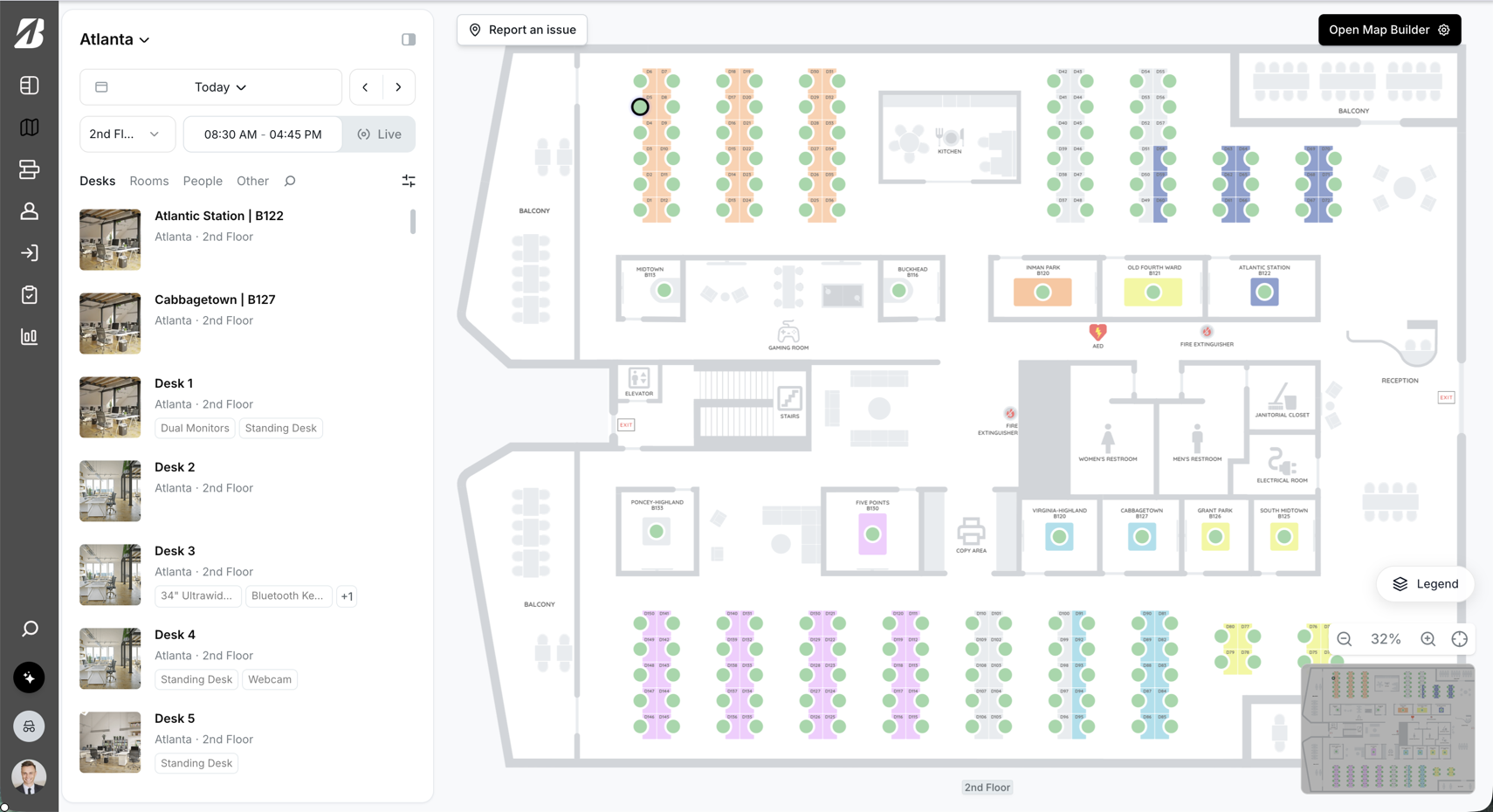
Tactic live workplace map
Built for daily adoptionBooking · maps · workplace operations

Trusted by fast growing companies

A&EVeeamHPECometVertivRE/MAXSmartSweetsNorthwestern University
Why Tactic

A connected workplace, in practice.

Bring one team day and one workplace change to both demos. Check the experience for employees, the operational handoffs, and the planning capabilities included in your scope.

Visual coordination
Atlanta · 2nd floor8 teammates in
Focus rooms
AMJRKL
Desk B214 · Available

See the team before you book

Use a live map to understand who is in, where teams are sitting, and which spaces are open.

Room workflows
Rooms todayLive availability
9:00Atlas · Team sync
11:00Sequoia · Client call
2:30Canyon is open

Coordinate rooms and calendars

Move from availability to booking and check-in with the context employees need.

Workplace insight
Office demandLast 30 days
MTWTF
Wednesday peaks82% utilization

Turn activity into clearer decisions

See weekday patterns and utilization trends without stitching together separate reports.

Make the comparison count

The right platform.
For the way you work.

Comparing Tactic and Kadence? Look at how team coordination connects to the rest of the office: room services, workplace requests, seating, moves, and the tools employees already use.

Why shortlist Tactic

Bring booking and operations together.

Keep people, spaces, and requests connected. Start with the products you need and let employees use Tactic inside Microsoft Teams.

Evaluate the fit

Test today’s work and tomorrow’s changes.

Bring one team day and one workplace change to both demos. Check the experience for employees, the operational handoffs, and the planning capabilities included in your scope.

The buyer task

Coordinate a team day and a subsequent seating change

Documentation-based comparison; competitor workflows have not been tested firsthand. The steps below are a reproducible evaluation protocol, not a timed benchmark.

  1. Give both products the same team, weekly office pattern, bookable resources and permissions.
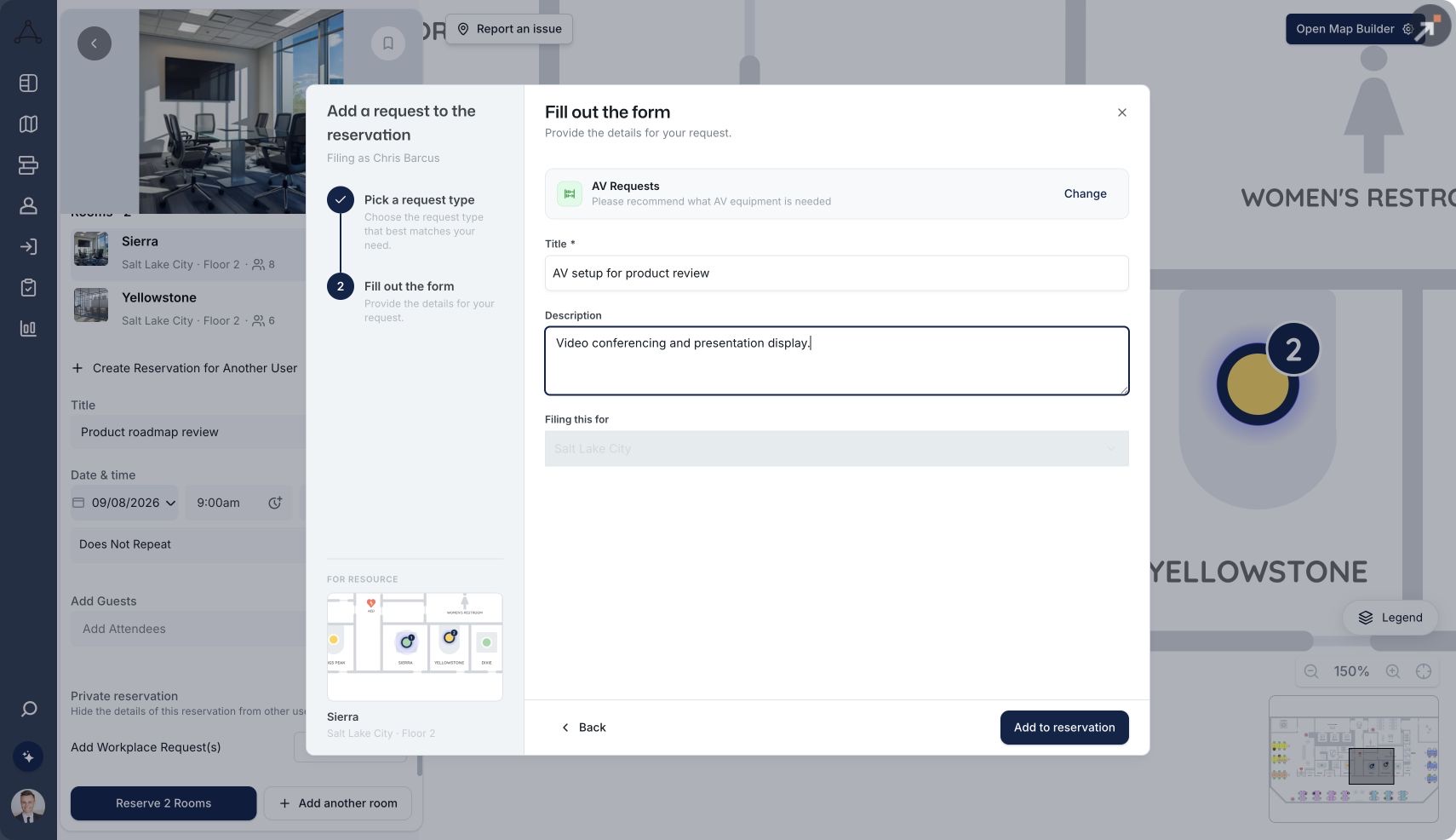
  2. Plan a team day, reserve nearby desks and a suitable room, then attach the required meeting service.
  3. Move the team to a different floor and verify assignments, employee discovery and availability.
  4. Compare the required WorkOps and SpaceOps scope, AI action coverage, administrative handoffs and usable exports.

Compare the completed task, exceptions, admin handoffs and data consistency in both products. Ask each vendor to demonstrate the result with your inputs. Use the same plan scope, roles, data and required integrations. Record setup work and exceptions, not just the successful path.

What mattersTacticKadence
Desk & resource bookingBook from a live map; manage desks, assigned seating, parking, and lockers. Explore →WorkOps lists desk and room booking, floor plans, and team coordination.
Teams & employee accessUse the full Tactic interface inside Teams, plus Slack booking, reminders, and check-ins. Explore →Lists Microsoft Teams and Slack integrations, alongside HRIS connections.
Rooms & meeting servicesConnect Outlook and Google Calendar bidirectionally, book multiple rooms, and attach services to reservations. Explore →Lists room booking and catering. Test multi-room changes and service handling.
Space & workplace operationsConnect seating, moves, utilization, and location-based workplace requests. Explore →WorkOps includes moves; SpaceOps covers stack, scenario, occupancy, and space planning.
Identity & directory syncSupport SSO, SAML, SCIM, and directory integrations. Confirm your provider and provisioning needs. Explore →Lists SSO, Active Directory, and SCIM. Confirm your provider and plan.
Pricing & rolloutEstimate selected products using managed resources and locations. Confirm onboarding and integration scope. Explore →Publishes active-user billing and separate WorkOps/SpaceOps scope. Confirm floors, onboarding, and annual terms.

Sources and method. Maintained by Tactic · Last reviewed October 15, 2026. Accountable role: Tactic website content lead. This is a documentation-based comparison, not a firsthand competitor benchmark. The workflow is an evaluation protocol, and the Tactic images are product examples, not a completed side-by-side test. Product references: Kadence plans / scope ↗; Kadence reference 2 ↗; Tactic products and pricing; Tactic integrations. Confirm plan-specific availability and contract terms with each vendor. Licensed G2 report dates and sample counts below remain separate historical evidence.

Equivalent commercial scope

Compare one desk-booking deployment.

Same base inventory: 100 bookable desks, one location, 250 employees, 12 months, USD. This is a desk-only illustration, not a quote for the full workplace workflow above.

Annual base example · estimator checked October 15, 2026
ScopeTacticKadence
100 desks · 1 location · 12 months$3,600–$4,800 rough annual range from the live pricing estimator. Not a contractual quote.Quote required for this exact inventory and annual period. No equivalent verified quote is available here; no savings claim is made.
Excluded from this baseRooms, visitors, custom resources, requests, managed services and space/move products. Confirm identity, integrations, onboarding, floor-plan setup, support and taxes separately.Ask for the same scope rather than a differently bundled entry plan. Confirm included users/resources, minimums and all setup, hardware and service fees.
Full workflow quoteQuote the same selected products, resource inventory, locations, users, integrations, hardware, onboarding, support and renewal terms.Specify WorkOps and any SpaceOps requirement, active users, floor-plan setup, integrations and annual terms. Quote the same full workflow requirements, not the desk-only base alone.

Employee count is an evaluation input, not a promise of an unlimited-user contract. Final pricing and exact inclusion depend on the proposal. Where a public price is not equivalent to this deployment, request an equivalent quote from both vendors.

The customer perspective · G2

Real reviews. A clearer signal.

Compare selected ratings from the licensed Spring 2026 report for Tactic and Kadence. Each score includes its question-level response count.

Selected G2 ratings · Spring 2026
RatingTacticKadence
Ease of Setup94%188 responses89%72 responses
Ease of Use94%505 responses92%90 responses
Meets Requirements93%498 responses87%89 responses
Desk Booking96%251 responses96%53 responses
Calendar Scheduling93%188 responses86%21 responses
Room Booking96%201 responses88%25 responses

Source: G2, “Tactic and Kadence | Spring 2026.” Reviews collected through February 22, 2026; 555 Tactic reviews and 129 Kadence reviews overall at that time. As of October 2026, G2 lists Kadence at 4.5 out of 5 from 143 reviews. Response counts vary by question. Tactic selected these metrics from its customized, licensed report. Percentages are shown as displayed by G2, not feature-availability scores. Historical ratings are not live scores, an endorsement, or a guarantee of results.

Product proof

What connected workplace operations look like.

See the workflows employees and workplace teams use to plan the week, reserve space, welcome visitors, and keep the office running.

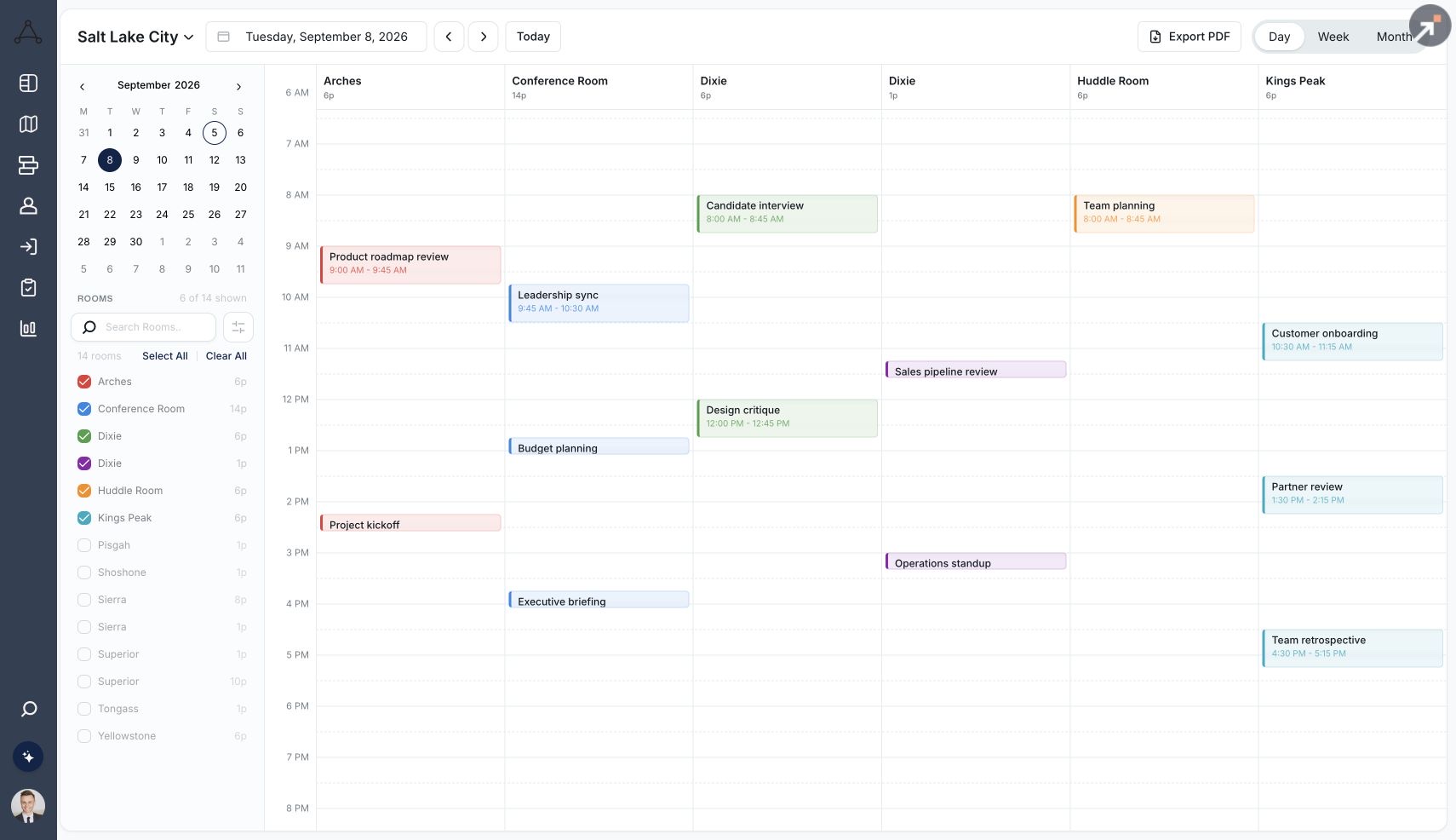
Tactic meeting room scheduling timeline
Room scheduling

Book rooms with less friction.

Keep availability, room details, and Outlook or Google Calendar connected.

Explore room booking →
From evaluation to everyday use

Make the next step. A clear one.

A good switch starts with a shared plan. Use these checkpoints to scope your move to Tactic before committing to a launch date.

01 · SCOPE

Map what matters.

Identify locations, products, floor plans, directory sources, booking rules, and the workflows you need to keep.

02 · VALIDATE

Test a real workday.

Pilot the map, Teams access, calendar synchronization, room services, and request routing with employees and admins.

03 · LAUNCH

Agree the handover.

Confirm data migration, future reservations, training, support ownership, and a cutover plan with your team.

These are evaluation checkpoints, not a fixed implementation timeline or a promise that every legacy record can be imported.

Record-level switching plan

Agree what transfers, what is rebuilt and who signs off.

Evaluation checklist, not a promise of a supported import
Records / workHandling to agreePilot acceptance check
People and identityExport the employee/team inventory and identify the authoritative directory. Confirm field mapping and provisioning before enabling users.One employee creation, team change and deactivation reconcile correctly in a pilot.
Floor plans and resourcesCollect approved plan files, desk/room inventories, amenities and stable identifiers. Agree what can be imported and what must be recreated.The pilot map matches the physical floor and every room maps to the correct resource calendar.
Assignments and booking rulesInventory assigned seats, neighborhoods, delegates, access rules and recurring policy exceptions. Configure and review the supported equivalents.Assigned and shared seating, booking limits and representative exceptions behave as intended.
Future reservations and recurring meetingsKeep a dated export and choose the system of record for each calendar. Confirm whether records can be transferred, retained in the calendar or must be rebooked.No duplicate bookings; edits, cancellations, recurring exceptions and time zones reconcile.
Historical utilization and service recordsExport the records your policy requires and retain a readable archive. Do not assume legacy analytics or ticket history can be imported.The archive is accessible and new reporting has a documented start date and consistent definitions.
Visitor records and integrationsScope host data, visitor policy, retention and permitted transfer. Plan the reconnection of calendars, identity, chat, panels and access systems.Approved sample flows work without duplicate invitations, stale access or broken notifications.
Cutover and rollbackName the owner of data, integrations, employee communication and support. Agree a freeze window, pilot sign-off, launch checks and rollback decision.Owners accept the cutover checklist and can restore the agreed fallback if checks fail.

Your workplace lead owns resource and seating sign-off; IT owns directory and calendar checks; the implementation lead coordinates the pilot, cutover and fallback; the service owner accepts request routing. Name the people in your rollout plan before setting a launch date. No universal migration timeline or automatic transfer of every record is promised.

Bring us the workflows you want to improve.

We’ll walk through how Tactic fits your workplace, identify the products and integrations you need, and scope your rollout.

Tactic vs Kadence · FAQ

Questions worth asking. Before you choose.

Is Tactic an alternative to Kadence?

Yes. Tactic brings booking, people, spaces, and workplace requests together. Bring one team day and one workplace change to both demos. Check the experience for employees, the operational handoffs, and the planning capabilities included in your scope.

How should we compare Kadence WorkOps and SpaceOps with Tactic?

Separate the everyday workplace workflows from the planning requirements. Run booking, team coordination, and service requests first; then demonstrate the seating or move scenario you need. Confirm which products, integrations, and implementation services each quote includes.

Can employees use Tactic inside Microsoft Teams?

Yes. The Tactic Teams app embeds the full Tactic interface inside Microsoft Teams. Tactic also supports Slack booking, reminders, and check-ins. Test the specific actions your employees need during your evaluation.

How should we compare Tactic and Kadence pricing?

Use the same list of desks, rooms, locations, other resources, products, and integrations for both quotes. Confirm employee or usage limits, onboarding, hardware, support, add-ons, and renewal terms before comparing total cost.

What should we check before switching from Kadence?

Review floor plans, seating assignments, employee directories, booking policies, future reservations, historical records, and calendar integrations. Agree what can be imported, what must be configured, and how the cutover will work. Do not assume every record transfers automatically.

How long will implementation take?

Timing depends on locations, data readiness, integrations, and internal approvals. Agree a project-specific plan with Tactic, including a pilot and ownership of training and support. Historical customer averages are not delivery commitments.

Where do the G2 scores come from?

They come from Tactic’s licensed Spring 2026 comparison with Kadence, using reviews collected through February 22, 2026. The page shows selected ratings and response counts with a link to the full customized report. They are historical ratings, not live scores.


Tactic
Book a demoLog in